
USCF & FIDE Ratings
TournaChess integrates with both USCF (US Chess) and FIDE to bring official ratings, membership validation, and results export into your tournament workflow. This guide covers how rating types work, what happens when players register for rated events, how membership validation keeps your tournament compliant, and how to export results for official submission.
Rating Types Overview
Every section in a TournaChess tournament has a rating type that determines how ratings are used for pairings, display, and results reporting. You set the rating type when you create or edit a section, so a single tournament can mix rated and unrated sections to accommodate different player groups.
Unrated
No rating requirements and no results submission. Players do not need a USCF or FIDE ID to register. This is the right choice for casual club nights, scholastic fun events, or any situation where official ratings are not needed.
USCF-Rated
Official USCF ratings are used for pairings and displayed throughout the tournament. When players register with a USCF ID, TournaChess automatically looks up their current rating. After the tournament, you can export results in USCF format for submission to US Chess. Players should have an active USCF membership to participate in USCF-rated sections.
FIDE-Rated
FIDE ratings are displayed and used for pairings. Players register with their FIDE ID, and TournaChess retrieves their FIDE standard, rapid, or blitz rating depending on the section's time control. After the event, you can export results in FIDE-compatible format for submission to your national federation.
USCF+FIDE Dual-Rated
Both rating systems are active in the same section. TournaChess retrieves and displays both USCF and FIDE ratings for each player. You can configure which rating system the Swiss pairing algorithm uses for seeding -- USCF or FIDE -- on a per-section basis. The default for dual-rated sections is USCF. Results can be exported in both USCF and SJSON (SwissSys JSON) format as required by USCF for dual-rated event submission.
Tip: Rating type is set per section, not per tournament. This means you can run an Open section as USCF+FIDE dual-rated while keeping a Beginners section unrated, all within the same tournament.
USCF Integration
TournaChess connects directly to the USCF API to provide automatic rating lookups, title display, and pairing intelligence for USCF-rated sections.
Automatic Rating Lookups
When a player enters their USCF ID during registration, TournaChess automatically looks up their current USCF rating from the USCF API. The rating is retrieved in real time and stored with the registration, so it is immediately available for pairings and display.
If a player has linked their USCF ID to their TournaChess profile, the lookup happens automatically whenever they register for a rated tournament -- no need to re-enter the ID each time.
Daily Rating Sync
TournaChess automatically refreshes USCF rating data periodically so that the ratings in your tournament reflect the most recent official values. If a player's rating changes between registration and the start of your event, the updated rating will be reflected in your entry list and pairings. A tournament director can force a manual refresh of all USCF ratings from the tournament management page if needed.
Rating Display
USCF ratings appear throughout the tournament experience: entry lists, pairings, standings, and projector views. Players and tournament directors can see the field strength at a glance without consulting any external tools.
Player Title Display
If a player holds a chess title recognized by USCF or FIDE -- such as NM (National Master), FM (FIDE Master), IM (International Master), or GM (Grandmaster) -- the title is displayed next to their name throughout the platform. Titles appear in entry lists, pairings, standings, and projector views. Title information is retrieved automatically during the rating lookup.
USCF Membership Validation
Running a USCF-rated tournament means ensuring that all participants have valid USCF memberships. TournaChess automates this process so you can focus on running the event rather than manually checking membership cards.
How Validation Works
When a player registers for a USCF-rated or USCF+FIDE dual-rated section, TournaChess checks their USCF membership status automatically. The system retrieves the player's membership expiration date from the USCF database and compares it against the tournament dates to determine whether the membership is valid for the duration of the event.
USCF Rule Compliance
TournaChess follows USCF rules when validating memberships. The rules state that a player's membership must be valid through the end of the tournament, not just the current date. In practice, this means:
- A player whose membership expires after the tournament's end date is shown as valid.
- A player whose membership expires during the tournament (before the last day) is shown as invalid, because their membership does not cover the entire event.
- A player whose membership expires on the last day of the tournament is still valid -- they are covered for the full event.
This date-aware validation prevents the common mistake of accepting a player whose membership looks current today but will expire before the tournament finishes.
Visual Indicators
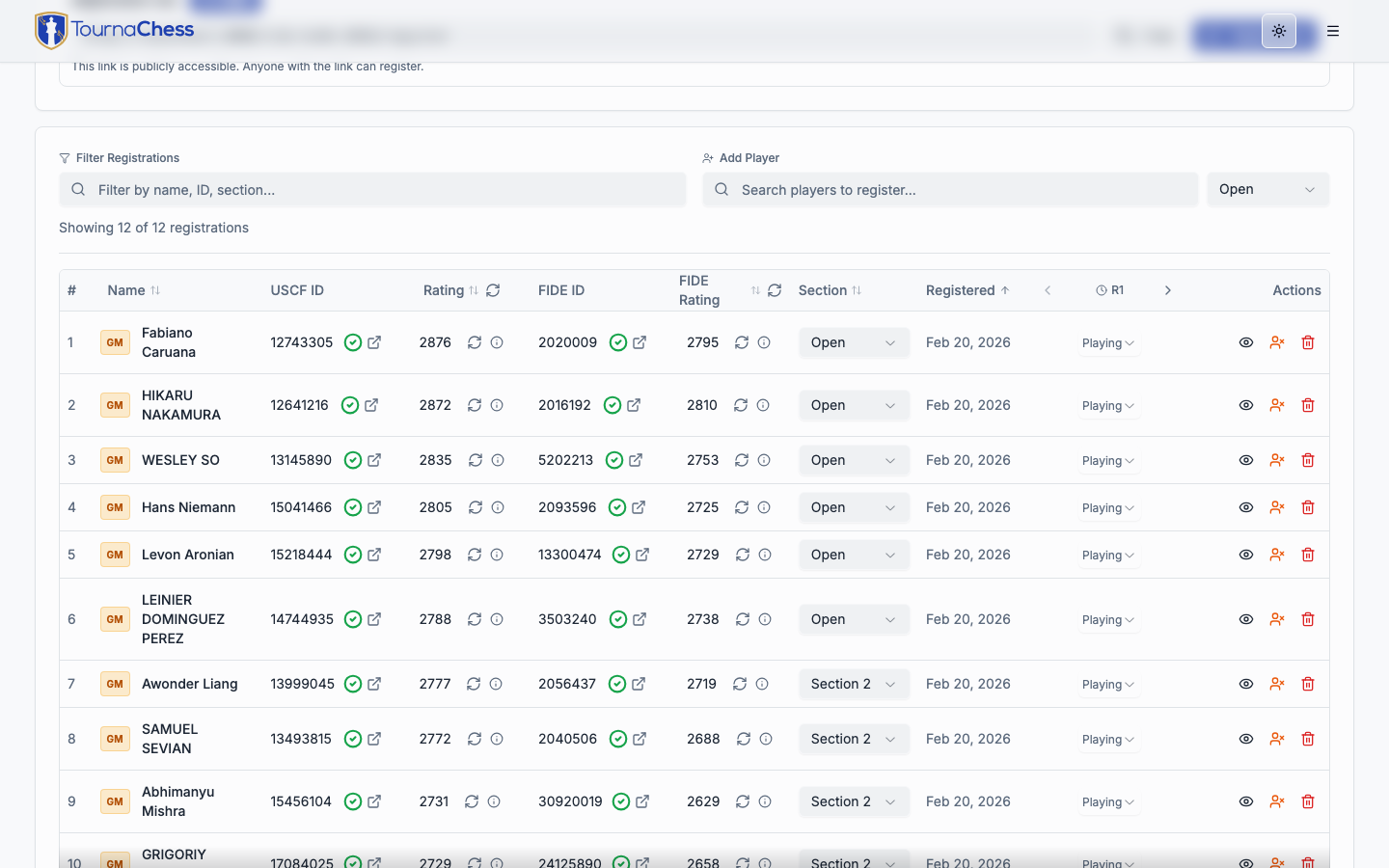
Membership status is shown with color-coded icons next to each player's USCF ID in the registration list:
- Green checkmark: Membership is valid through the end of the tournament. No action needed.
- Orange icon: The USCF ID was found but the player does not have an active membership on file. They may have created an ID but never purchased a membership.
- Red X: Membership has expired or will expire before the tournament ends. The player needs to renew before they can participate in rated play.
These indicators are visible on the registrations tab of your tournament management page, giving you a quick overview of your field's membership status.
Note: If a player's USCF ID is not found in the US Chess database at all, the indicator shows a red X with a tooltip explaining that the ID was not found. Double-check the number with the player and update it in their registration.
Batch Validation
Before starting a tournament, you can review all registered players' membership statuses at once from the registrations tab. The visual indicators appear next to every player with a USCF ID, so you can scan the list and identify anyone who needs to renew before the first round.
FIDE Integration
TournaChess supports FIDE-rated events with ID validation, rating retrieval, and title display. Whether you are running a FIDE-only section or a dual-rated USCF+FIDE event, the platform handles the FIDE data alongside USCF data.
FIDE ID Validation
Players can link their FIDE ID to their TournaChess profile or enter it during tournament registration. TournaChess validates the FIDE ID against the FIDE database and retrieves the player's name, federation, ratings, and title. If the ID is not found, a warning is displayed so you can follow up with the player.
FIDE Rating Display
FIDE ratings are shown alongside or instead of USCF ratings depending on the section's rating type:
- FIDE-rated sections: FIDE ratings are the primary rating displayed in entry lists, pairings, and standings.
- USCF+FIDE dual-rated sections: Both USCF and FIDE ratings are displayed, giving you and your players a complete picture of the field.
TournaChess retrieves FIDE standard, rapid, and blitz ratings. The appropriate rating type is selected based on the section's time control category.
FIDE Titles
FIDE titles are displayed next to player names throughout the platform. Supported titles include:
- GM (Grandmaster), IM (International Master), FM (FIDE Master), CM (Candidate Master)
- WGM (Woman Grandmaster), WIM (Woman International Master), WFM (Woman FIDE Master), WCM (Woman Candidate Master)
Title information is retrieved automatically when the FIDE ID is validated. If a player holds both a USCF title and a FIDE title, both are displayed.
Dual-Rated Sections
Dual-rated sections (USCF+FIDE) allow you to run a single section that counts for both rating systems. When you create a dual-rated section, you configure which rating system the pairing algorithm uses for seeding. The default is USCF, but you can switch to FIDE if desired.
In dual-rated sections, the export dialog offers both USCF export (DBF format) and SJSON export (SwissSys JSON format). The SJSON format includes both USCF and FIDE data, which is required for submitting dual-rated results to USCF.
Note: If you need a FIDE ID, your national chess federation can assist with the registration process. In the United States, contact US Chess to obtain a FIDE ID.
Rating Calculations
TournaChess calculates performance metrics for each player during and after the tournament, giving players insight into how they performed relative to their rating.
Performance Ratings
A performance rating represents the rating level at which a player performed during the tournament, based on their results against their specific opponents.
Performance ratings correctly exclude forfeits and byes from the calculation. Only games where the player actually faced an opponent are included, so a forfeit win against a no-show does not inflate the performance rating, and a forfeit loss does not deflate it.
For tournaments with unrated players, TournaChess uses a two-pass algorithm: the first pass estimates unrated opponents at a default rating, and the second pass recalculates using each unrated player's first-pass performance rating for more accurate results.
Estimated Post-Event Ratings
Players can see their projected rating change based on their results so far. This is only an approximation of the official USCF calculation, but it gives players a sense of how their performance will affect their rating once USCF processes the results.
Per-Section Statistics
Each section has its own rating statistics visible in the standings view, including average rating and rating range. This helps you understand the competitive balance of each section.
Per-Player Statistics
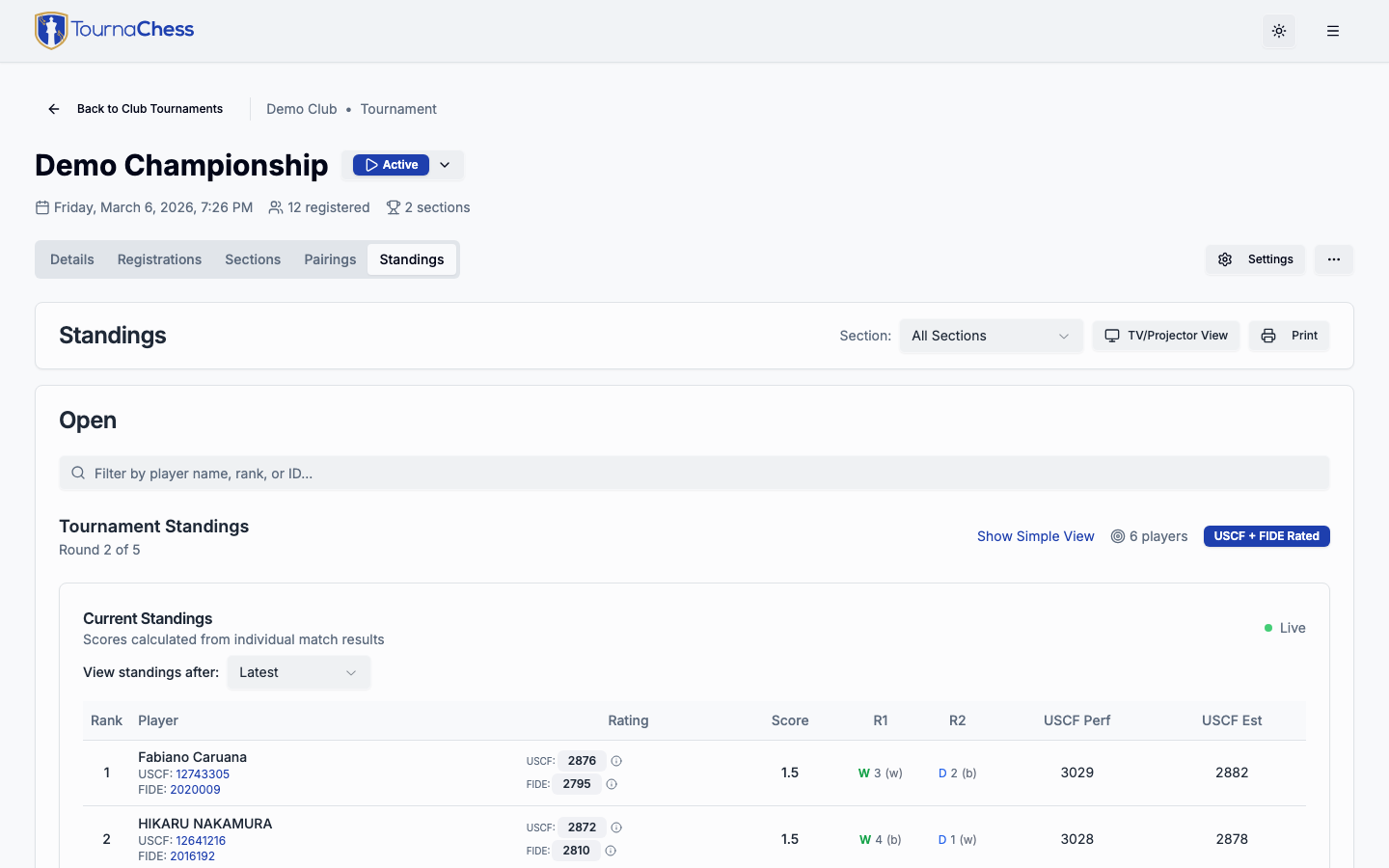
Individual performance metrics are available in the standings table. For each player, TournaChess displays:
- Pre-tournament rating: The player's official rating at the start of the event.
- Performance rating: The rating level at which they performed based on opponents and results.
- Estimated post-event rating: The projected new rating after USCF processes the results.
These columns appear in the standings table for USCF-rated and dual-rated sections, giving players immediate feedback on their tournament performance.
Results Export
After your tournament is complete, TournaChess generates export files that you can submit to USCF or your national federation for official rating processing.
USCF Results Export
To export results for USCF submission:
- Open your tournament's management page.
- Click Export in the tournament actions.
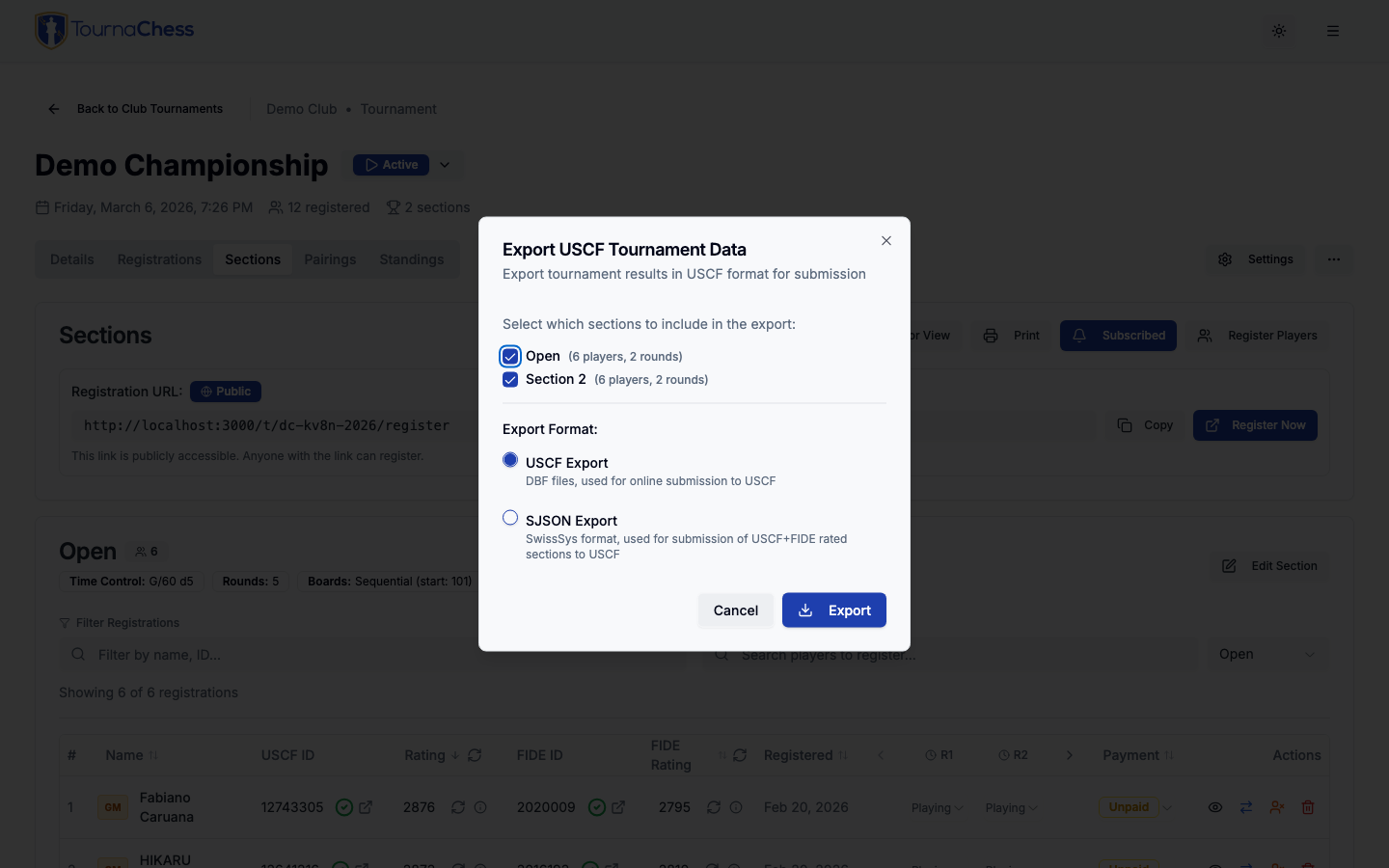
- In the export dialog, select which USCF-rated sections to include. Only sections with a rating type of USCF-Rated or USCF+FIDE Dual-Rated appear in the list.
- Choose your export format:
- USCF Export -- Generates DBF files packaged in a ZIP archive. This is the standard format accepted by the USCF online submission portal.
- SJSON Export -- Generates a SwissSys JSON file. This format is used for submitting USCF+FIDE dual-rated sections and includes both USCF and FIDE player data.
- Click Export. TournaChess validates the data, generates the file, and downloads it to your computer.
The export includes everything USCF needs: tournament metadata (name, dates, location, affiliate ID, chief TD), section details (time control, rating system, rounds), and player data (IDs, names, ratings, round-by-round results with colors and opponents).
Tip: Before exporting, make sure your tournament's USCF configuration is complete. Go to your tournament settings and fill in the USCF-specific fields: affiliate ID, chief TD USCF ID, city, state, and ZIP code. These fields are required for a valid USCF submission.
What's Included in the Export
Every export file contains the following data:
- Tournament information: Event name, dates, location, USCF affiliate ID, and organizing officials (chief TD, assistant TDs).
- Section details: Section names, time controls, rating systems (regular, quick, blitz, dual), number of rounds played, and scholastic level indicators.
- Player records: Names, USCF IDs (and FIDE IDs for SJSON exports), pre-tournament ratings, state of residence, and provisional status.
- Round-by-round results: For each round, the opponent's pairing number, the player's color (white or black), and the game result (win, loss, draw, bye, forfeit, or unplayed).
- Scores and statistics: Total scores, tie-break values, performance ratings, and estimated post-event ratings.
Submitting to USCF
TournaChess generates the export file; you handle the submission. The process works like this:
- Export your results from TournaChess (as described above).
- Log in to the USCF Tournament Submission portal at US Chess.
- Upload the exported files following USCF's submission instructions.
- USCF processes the results and updates player ratings.
TournaChess does not submit results to USCF on your behalf. The export produces a file in the exact format USCF expects, so the upload is straightforward.
Importing USCF Events
If you have already run a tournament rated by USCF and want to bring its results into TournaChess -- for Grand Prix tracking, historical records, or to have all your club's events in one place -- you can import a completed USCF event directly from the USCF ratings site.
What Gets Imported
TournaChess pulls everything it needs from the USCF API to reconstruct the tournament:
- Tournament details: Event name, dates, location, affiliate information, and organizing officials (chief TD and assistant TDs).
- Sections: Each section in the USCF event becomes a section in TournaChess, with its rating system (regular, quick, blitz, or dual) and time control preserved.
- Players: All players are imported as guest players with their USCF IDs, pre-tournament ratings, and state of residence.
- Rounds and games: Every round is recreated with full game records including board assignments, colors, and results (wins, losses, draws, forfeits, and byes).
- Standings: Player standings are calculated with win/loss/draw/bye statistics and performance ratings.
The imported tournament is created in Completed status, ready for viewing and Grand Prix inclusion.
How to Import
- Find the event on the USCF ratings site. Copy the event URL from your browser's address bar. It will look like
https://ratings.uschess.org/event/202401234. - In TournaChess, go to your club's tournaments page.
- Click Import from USCF.
- Paste the event URL and click Import.
The import may take a moment for large tournaments while TournaChess fetches all the player and game data.

Duplicate Detection
If you try to import an event that has already been imported into your club, TournaChess will warn you and show a link to the existing tournament. You can choose to proceed with a second import or cancel and view the existing one instead.
After the Import
The imported tournament appears in your club's tournament list like any other completed event. You can:
- View standings and pairings for any round.
- Include it in a Grand Prix series for cumulative scoring across events.
- Share the tournament page with players so they can review their results.
Limitations
- Completed events only: The USCF API provides data for rated events that have been processed. Events that have not yet been rated by USCF are not available for import.
Tip: The import button is also available in the Quick Actions sidebar on your club's homepage.
Frequently Asked Questions
What if a player does not have a USCF ID?
Players without a USCF ID can still register for unrated sections. For USCF-rated sections, they need to obtain a USCF membership and ID before participating. Direct them to the US Chess website to purchase a membership.
Can I change a section's rating type after players have registered?
It is best to set the rating type when creating the section. Changing the rating type after players have registered may cause inconsistencies with rating data and membership validation. If you need to make a change, review all registrations afterward to ensure the data is complete and correct.
Why does the estimated post-event rating differ from what USCF calculates?
TournaChess implements a simplified approximation of the USCF rating calculation. TournaChess does not have all of the details that USCF uses to do its calculation. The forumula used by TournaChess is a simplified version for approximation purposes. The actual USCF calculation is more sophisticated and may yield different results. The estimated post-event rating is meant to give players a general sense of how they performed, but the official USCF rating change may differ once USCF processes the results.
Can I run a FIDE-rated section without USCF?
Yes. You can set a section's rating type to FIDE-Rated, and only FIDE ratings will be used for pairings and display. USCF IDs and memberships are not required for FIDE-only sections.
Related Guides
- Getting Started -- Learn how to link your USCF and FIDE IDs to your TournaChess profile.
- Running Tournaments -- Pairings, results entry, and round-by-round tournament management.
- Creating Tournaments -- Detailed tournament configuration options including sections, entry fees, and rating setup.
Still have questions? Visit our Contact page to get in touch with TournaChess support.