

Running Tournaments
This guide covers everything you need to manage a live tournament on TournaChess, from reviewing your entry list before the first round to printing final standings. If you have not yet created a tournament, start with Creating Tournaments to get your event set up and configured.
Tip: Running several events on the same day -- say a kids' night alongside a blitz tournament? Each tournament page sets your browser tab's title to the tournament's name, so you can keep every event open in its own tab and tell them apart at a glance.
Pre-Tournament Checklist
A few minutes of preparation before your first round can save you from headaches later. Here is what to review before you generate pairings.
Review the entry list
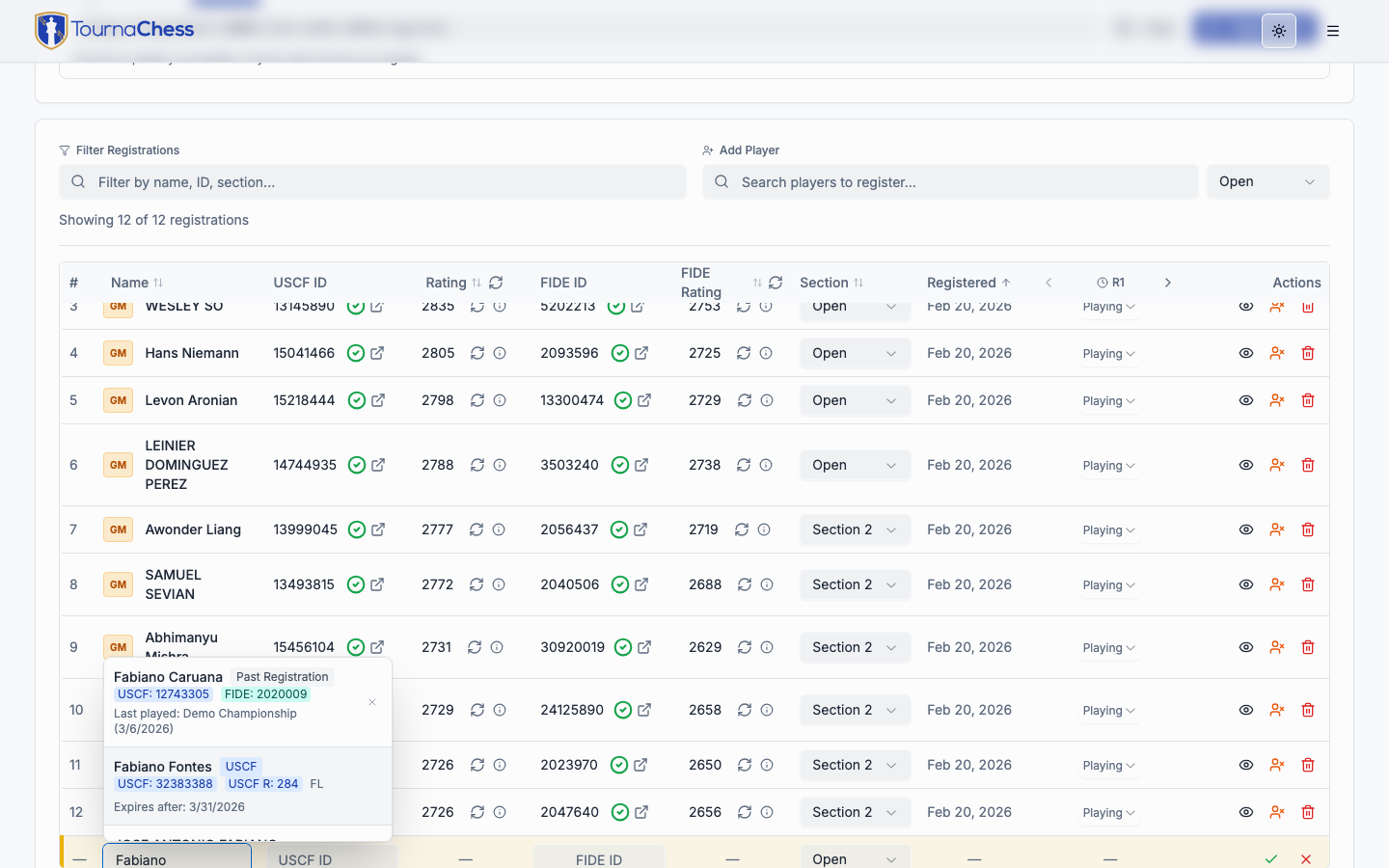
Open your tournament's management page and check the Registrations tab. This shows every registered player, along with their rating, USCF and/or FIDE ID, registration status, and payment status (if entry fees are configured). Confirm that each player is in the correct section and that the total count looks right.
If a player registered for the wrong section, you can move them from the entry list before pairings are generated. Once pairings have been created, section changes require removing the player and re-adding them.
If your entry list lives in a spreadsheet -- a paper sign-up typed up, a Google Form's responses, an export from another event -- you can load the whole thing at once with Actions → Import → Import Registrations instead of adding players one by one. Nothing is saved until you have reviewed every row. See importing a roster from a spreadsheet.
Check USCF membership validity
For USCF-rated sections, TournaChess automatically checks each player's membership status against the tournament dates. Look for the colored indicators next to each player's name:
- Green -- Membership is valid for the entire tournament duration.
- Red -- Membership has already expired or will expire during the tournament. The player must renew before playing in a rated section.
- Gray question mark -- No answer came back from US Chess, so the status is unknown. Nothing is wrong with the player's ID as far as we know; check it yourself, or refresh once US Chess is responding again.
You can click the refresh icon in the rating column of the table header to batch-check every player's membership against the live USCF database. This is especially useful on tournament morning when memberships may have been renewed overnight.
Tip: If a player tells you they renewed their membership but it still shows red, use the Validate button next to their name to re-check against the USCF database in real time. If the data has not propagated yet, this status does not block proceeding with the tournament, but it will need to be resolved before results can be submitted to the rating organization.
Handle late registrations and walk-ins
Players sometimes show up on tournament day without registering in advance. Use the TD Quick-Add feature at the bottom of the registrations table to add them. Quick-Add lets you:
- Search players who have participated in any previous tournament at your club
- Search the USCF database by name or USCF ID
- Enter new player details manually
Quick-Add pulls in the player's name, rating, and USCF ID automatically when a match is found, so you do not have to type everything from scratch.
Generating Pairings
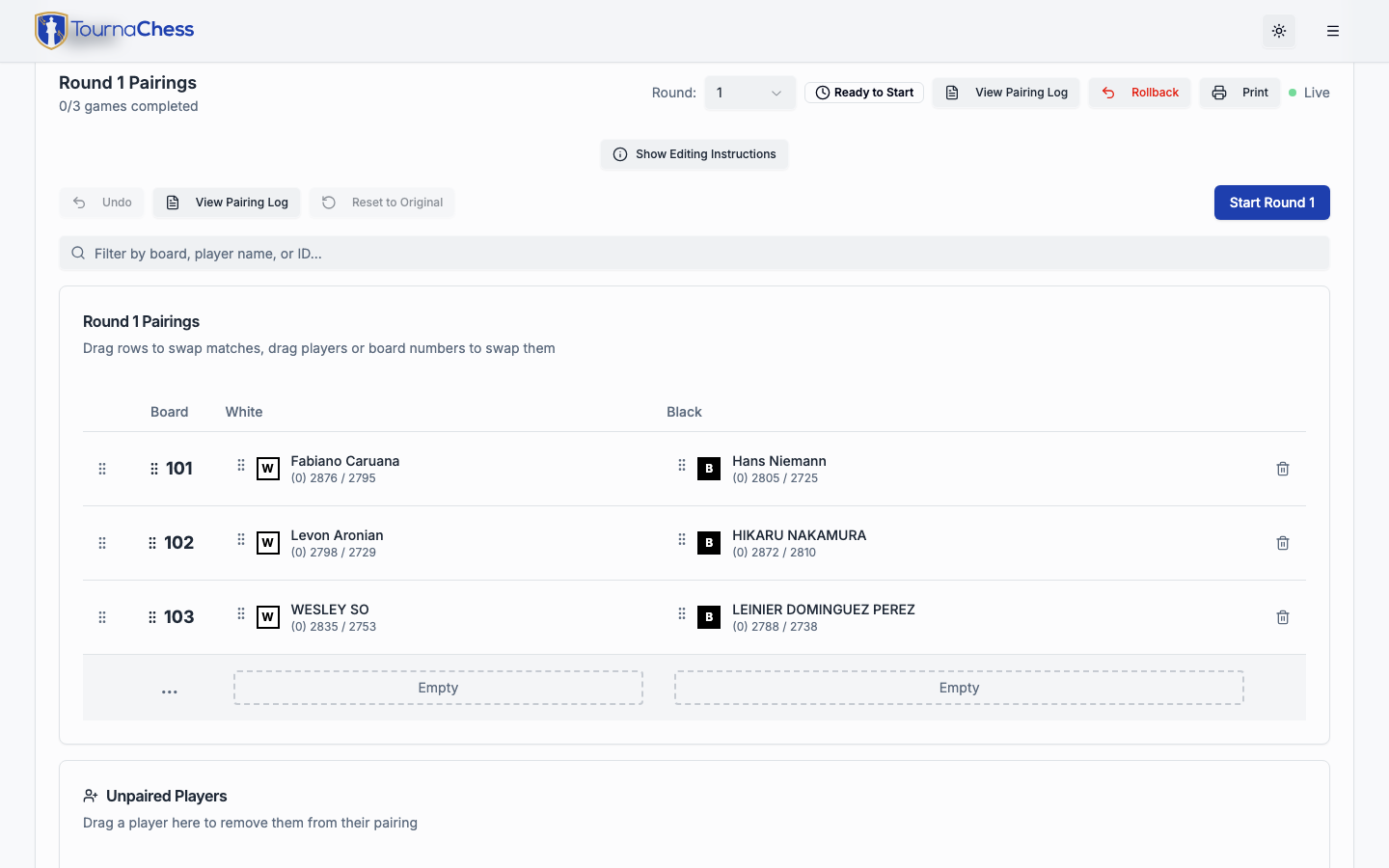
When you are ready to start a round, click Generate Pairings on the tournament management page. TournaChess creates pairings for each section independently and displays them on the pairings screen in a pending state. Pending pairings can be reviewed and edited before play begins. Once you are satisfied, click Confirm Round to lock in the pairings and begin the round.
Swiss system
Swiss is the default pairing format. TournaChess uses a proven pairing engine that follows USCF pairing rules, including:
- Score-based matching -- Players with equal or similar scores are paired against each other.
- Color balancing -- The engine tracks each player's color history and assigns White and Black as evenly as possible, following USCF color allocation guidelines.
- Avoidance of repeat opponents -- Players who have already faced each other in a previous round will not be paired again unless no other valid pairing exists.
- Rating-based seeding -- Within each score group, higher-rated players are paired against lower-rated players according to standard Swiss conventions.
For most tournaments, you do not need to think about any of this. Click the button and let the engine handle it.
How BYE assignment works
When a section has an odd number of active players, the pairing engine automatically assigns a BYE to one player. The method of selecting the player is dependent on the pairing algorithm chosen for the section. The BYE recipient receives 1 point by default (this is the standard algorithmic BYE).
If players requested BYEs during registration for specific rounds, those players are excluded from pairing for those rounds and receive whatever point value you configured -- typically half a point or zero points, depending on your tournament rules.
Tip: You can review and modify BYE schedules from the entry list before generating pairings. If a player changes their mind about a requested BYE, remove it before pairing the round and they will be included normally.
Pairing every section at once
When a tournament has several sections, Pair All in the Actions menu pairs the next round of every section in one step, instead of visiting each section in turn. It is available on an active tournament from any tab.
Before anything is paired, a dialog lists which sections will be paired and which will be skipped, with the reason for each: the section's current round still has games without results, its last pairings have not been confirmed yet, or it has already played all of its rounds. Click Pair All to continue. Sections are paired one after another, each with its own pairing method, and the dialog reports the outcome for every section. If a section fails -- no valid pairing exists, or the pairing service is unavailable -- the others are unaffected, and you can retry the failed section on its own.
The pairings Pair All produces are pending, exactly as if you had clicked Generate Pairings in each section, so review them and confirm each round as usual. When the run finishes, the page moves to the Pairings tab with all sections shown.
Reviewing and Editing Pairings
After generating pairings, they remain in a pending state until you click Confirm Round. While pairings are pending, you can review and adjust them freely. TournaChess gives you full control over every aspect of the pairings.
Finding a board
The filter box above the pairings list narrows it to the boards you care about. Type a board number, a player's name, a player's rating-system ID (USCF, FIDE or NWSRS, depending on how the section is rated), or a team / school name -- a team name matches every board where either player registered under it, so a coach can pull up their whole school at once. The filter works the same way on the pairings list and on the results screen while you are entering results.
Manual adjustments
Use the drag-and-drop interface to rearrange pairings. Drag a player from one board to another to swap them into a different matchup. The system visually highlights any pairing conflicts (such as repeat opponents) so you can make informed decisions.
Manual adjustments are common when you know something the algorithm does not -- for example, that two players from the same family should not be paired against each other in the first round, or that a specific matchup needs to be avoided for logistical reasons. For rated sections, consult the appropriate rulebook to ensure that any manual changes are acceptable under the rating organization's guidelines.
Changing board numbers
Board numbers are assigned automatically based on your section's board numbering configuration. If you need to change them, click on any board number in the pairings list to edit it directly.
Swapping colors
To switch which player has White and which has Black, drag one player over the other within the same match. The system will swap the players.
Adding and removing players from a round
If a player arrives late or you need to remove a no-show from the current round, you can do so from the pairings editor. There is an "Unpaired Players" section at the bottom of the pairings screen. Players not currently paired are there and can be dragged into the round. Players that should be removed can be dragged down into this section.
Retroactive edits
Sometimes you discover a pairing error after games have already started. TournaChess allows you to edit pairings even after a round is in progress. You can swap players between boards, change colors, or remove pairings. If results have already been entered for a game that you edit, the system will prompt you to confirm or re-enter the result.
Use retroactive edits sparingly -- they are intended for genuine corrections, not routine adjustments. When possible, catch issues before play begins.
Unavoidable pairing notices
For USCF Swiss sections, the pairing engine sometimes cannot fully satisfy every rule and produces the best legal round available. When that happens, the pending-confirmation banner shows a notice summarizing what could not be avoided -- for example, an unavoidable rematch (two players paired who have already met) or a color violation (a player assigned the same color more times than the rules normally allow). These situations are uncommon and usually occur in late rounds or small sections where no conflict-free pairing exists.
The notice summarizes the types of issues, not individual boards. Click View Pairing Log to open the pairing log, where an "Unavoidable pairings accepted" section lists the specific boards and players involved along with an explanation. Review those boards, then either adjust them manually if you have a better arrangement or click Confirm Round to accept the engine's pairings. If you edit the pairings, the notice stays visible but is reworded to note that it reflects the original pairings and some flagged issues may no longer apply -- use the pairing log to confirm which ones still stand.
Confirming the Round
When you have finished reviewing and editing pairings, click Confirm Round to begin play. Confirming the round transitions the pairings from pending to active:
- Players can see their pairings on the public tournament page and venue displays.
- Result entry buttons become active on the tournament management page.
You must confirm the round before you can enter any results. This two-step process -- generate pairings, then confirm the round -- ensures you always have a chance to review and correct matchups before games begin.
Entering Results
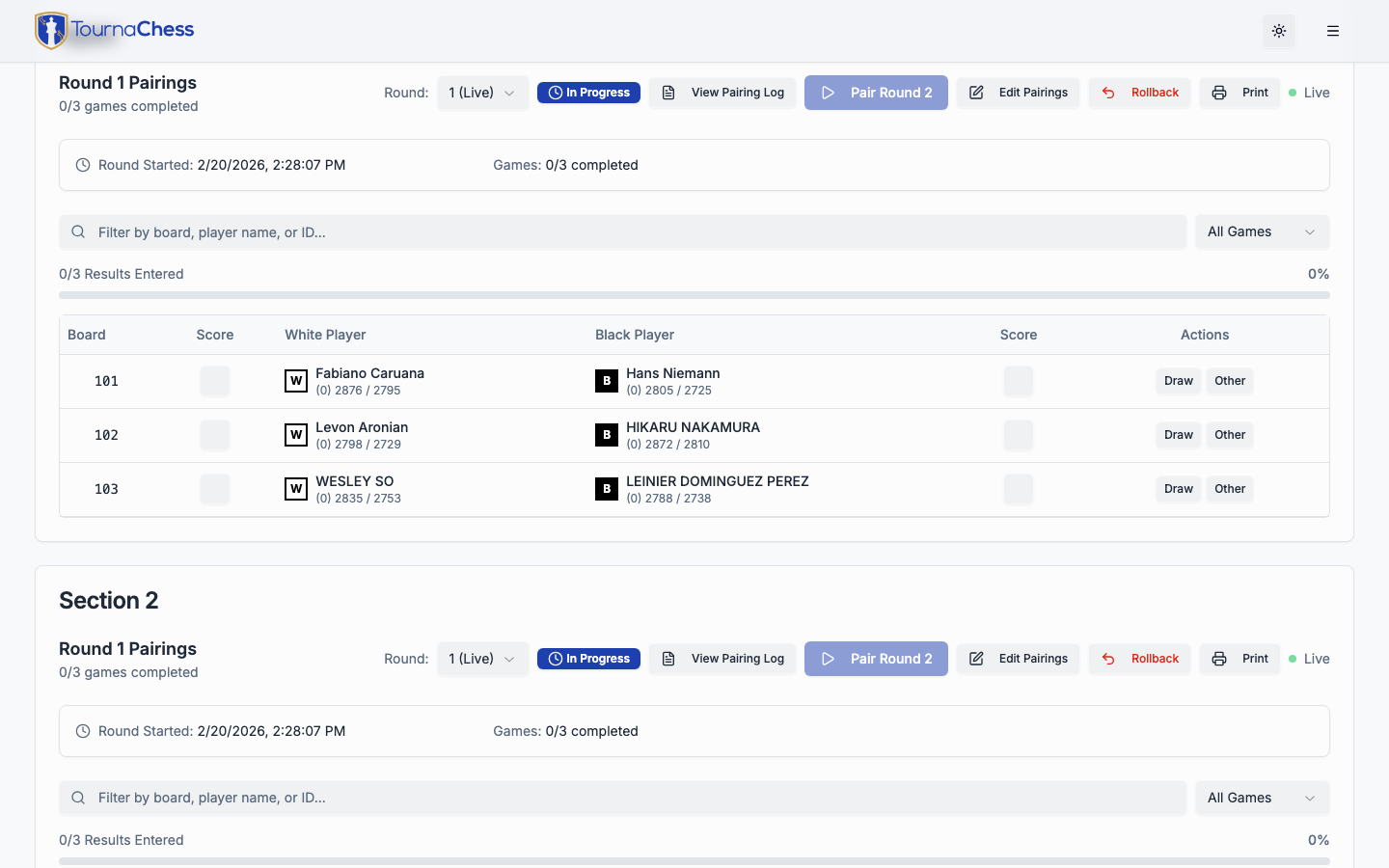
As games finish, enter results directly from the pairings screen. TournaChess is designed for fast, accurate result entry so you can keep the tournament moving.
1-click entry
Each board in the pairings list has three result buttons:
- 1-0 -- White wins
- 1/2-1/2 -- Draw
- 0-1 -- Black wins
Click the appropriate button and the result is saved immediately. There is no confirmation dialog and no page reload -- the button highlights to show the recorded result, and standings update in real time. You can enter results in any order as games finish.
If you click the wrong button, just click the correct one. The result updates instantly.
Advanced results
Some situations require more than the standard three outcomes. Click the Custom option on any board to access individual score assignment for each player. Custom mode handles:
- Normal forfeit -- Assign a forefeit-win and forefeit-loss.
- Double forfeit -- Both players receive 0 points. Use this when neither player shows up for the game.
- Custom scoring -- For any non-standard situation your tournament rules require, you can set each player's score independently.
Custom results are the exception, not the rule. For the vast majority of games, the 1-click buttons are all you need.
Editing past results
If you discover that a result was entered incorrectly -- whether from the current round or a previous one -- you can go back and fix it. Navigate to the round in question using the round selector on the pairings page, find the board, and click to change the result.
When you edit a result from a previous round, TournaChess recalculates standings and tiebreaks automatically. If pairings for later rounds have already been generated, the system warns you that standings may shift but does not automatically re-pair those rounds. Use your judgment as a tournament director on whether the correction warrants re-pairing.
Tip: Get into the habit of double-checking results as you enter them. A quick glance at the standings after each round can help you catch errors before they compound.
Round Management
Running a multi-round tournament involves more than just pairings and results. Here is how to handle the situations that come up between rounds.
Advancing rounds
After all results are entered for the current round, click Generate Pairings to create pairings for the next round. The system uses updated standings -- including all results, BYEs, and tiebreaks -- to produce the new matchups. As with the first round, the new pairings start in a pending state so you can review them before clicking Confirm Round. You do not need to manually close or finalize a round before generating the next one, though you should ensure that all results have been entered as they impact how the next round's pairings are generated.
Late entries
Players who join after Round 1 can still be added to the tournament. Use the TD Quick-Add feature from the entry list to register them. Late entries automatically receive 0-point BYEs for all rounds they missed. These zero-point BYEs ensure their score reflects only the rounds they actually played, while still allowing the pairing engine to match them appropriately going forward.
Late entries are paired normally starting from the next round after they are added.
Withdrawals
When a player needs to leave the tournament early, mark them as Withdrawn from the registrations list. Withdrawn players are excluded from all future pairings. Their past results remain in the standings and count toward tiebreak calculations for their opponents.
If a player has already been paired for the current round and then withdraws, their opponent receives a forfeit win (1-0 or 0-1 depending on color).
Players can also withdraw themselves using the Withdraw from this tournament button in their registration confirmation email, unless you disable Allow self-withdrawal on the Registrations tab. When a player self-withdraws, any TDs subscribed to registration notifications are emailed. The effect is identical to a TD-initiated withdrawal, and you can reinstate the player if they return.
Reinstatement
If a withdrawn player decides to return, you can reinstate them from the entry list. Click Reinstate next to their name, and they become eligible for pairing in the next round. Rounds they missed while withdrawn are recorded as 0-point BYEs, the same as late entries.
Emailing Your Players
Sometimes you need to tell the whole field something that no automatic notification covers: the venue changed, Round 1 slipped half an hour, parking is closed on the north side. Open Actions -> Email Players on any tournament tab, write your message, and choose everyone registered for the event, specific sections, one team, or one player.
To reach one player, open that player’s details from the Registrations or Sections tab and choose Email player. The composer names the player and asks for confirmation before sending to that registration’s contact address. If the player withdrew, has an abandoned checkout, or has no deliverable address, it will not send.
Emailing players is available on the Club and Pro plans. On the Free plan the dialog still opens and shows how many players would be reached, but the fields are disabled.
Three other things decide whether you can send. Your own email address must be verified -- if you signed up with an email and password and have not confirmed it yet, use the banner that appears when you are logged in to request a new link (see Getting Started); signing in with Google verifies you automatically. The shared Guest TD account cannot email players on any plan -- a message to the whole field should be traceable to a person, so sign in with your own club account to send one. And only club owners and admins can change the plan, so if you are a Tournament Director on a Free-plan club the dialog will ask you to get an owner or admin to upgrade rather than sending you to the billing page.
Who receives it
Every player registered for the tournament who has a deliverable email address, including waitlisted players. Withdrawn players are left out -- including one who played a round and then withdrew part-way through, who stays on the entry list but is no longer in the event -- along with abandoned checkout holds. Players who share one address (a parent who entered two children, say) receive a single copy. The dialog tells you the exact number before you send, and asks you to confirm, because a send cannot be recalled.
Players registered without an email address cannot be reached. If the count is lower than your entry list, that is usually why; the Email column on the Registrations tab shows which players have an address. Very rarely an address is also suppressed after it has hard-bounced, and those are left out of the count too, so the number you confirm is the number that will actually be attempted.
Emailing only some sections
All players is the default. When a tournament has more than one section, the dialog also offers Specific sections, which lists every section with the number of players it would reach on its own -- tick the ones you want. A K-5 round that slipped half an hour is news for the K-5 parents and nobody else, and this is how you tell them without mailing the Open section too.
The count above the Subject field always reflects what you have ticked, and it updates as you change the selection. It is not the section numbers added together: a parent with one child in K-5 and another in U1200 is a single address and receives a single copy, so the total for two sections can be lower than their two counts added up. The confirmation names the sections you picked along with the count, so you can check the audience one last time before an irreversible send.
A tournament with a single section has no section choice -- there is nothing to narrow to. If you tick nothing in a section selection, the dialog will not let you send.
Emailing a team or one player
Choose One team in the same Email Players dialog to reach a team within this tournament. Team names with no value are not offered, and a team that appears in several sections is included across those sections. To reach only some of its sections, turn on Limit to specific sections and tick them: the team and section choices intersect. The count is deduplicated across all selected registrations.
Choose One player to select a single tournament registration from the dialog. This is another way to reach the same person as Email player in their registration details; it does not combine with the section or team choices. If a selected team or player is no longer eligible while you compose, the dialog will not broaden the audience: select a current target before sending.
Writing the message
The message body uses the same editor as your tournament description, so you can add bold text, bullet lists, headings, and links, and switch to raw Markdown if you prefer. Each recipient gets their own copy -- addresses are never shared across the field -- with your club's name, the tournament name, and a link to the tournament page added around your text.
The link is left out when your recipients could not open it: a tournament still in Draft, which only its organizers can view, or one you have made private, which only club members can view. Those messages still name your club and the event, so players know why they received it.
Adding images
Use the image button in the editor's toolbar to put a picture in the message -- a flyer, a map of the new venue, a photo of the parking entrance. Pick a PNG, JPEG or WebP file up to 4MB and it is inserted where your cursor is. The picture is uploaded to TournaChess and resized to suit an email, so a photo straight off your phone does not arrive as a multi-megabyte download; its orientation is corrected and the rest of its metadata, including any location the camera recorded, is removed before anyone receives it.
Images have to be added this way. You cannot paste in a link to a picture hosted somewhere else: mail sent on your club's behalf should not report your players' reading habits to a site neither you nor we control, so the message is refused rather than sent with such a link. If you switch to raw Markdown and edit the image markup the button inserted, keep the web address inside the parentheses exactly as it is -- you can change the description freely, and it is worth doing, because that text is what a player sees in place of the picture.
That last point is the one to plan around: most email apps hide images until the reader asks for them, and some never show them at all. Put anything that matters -- a date, a time, a street address -- in the text as well as in the picture, so the message still works for a player who only ever sees the words.
There is a limit of 50 images per tournament. Removing a picture from a draft does not give the slot back, so a tournament you have been editing heavily can reach it; the dialog will say so if it does.
Where replies go
Replies go to your club's Contact email by default, or to the club owner's address when the club has no contact email set. You can override it for a single message in the Reply-to address field, which is useful when a specific director is handling questions about one event. See Club Management for the club-wide setting.
Send me a copy is on by default for tournament, section, team, and individual-player messages. It CCs the Reply-to address on one message, so you receive one copy rather than a copy for every player. If that address is already a player recipient, its player message is the copy and no extra CC is added. Turn the option off if you do not want a copy. If your club has no default Reply-to address, enter one or turn the option off before sending.
If your club has no contact email and the owner's account has no usable address either, the dialog asks you to type one. Send without it and the message simply does not invite a reply -- it still explains why the player received it, but replies would reach TournaChess rather than your club, so it does not promise otherwise.
Extra Games
Sometimes players receiving BYEs in different sections want to play a rated game against each other, even though the game is not part of the regular tournament pairings. TournaChess supports these as extra games -- rated games played outside of tournament sections that are included in the rating submission but do not affect tournament standings.
Extra games are only visible to Tournament Directors. They do not appear on the public tournament page.
When to use extra games
Extra games are most commonly used when:
- A player has a BYE in one section and wants to play someone from another section.
- Two players want a rated game during a round where neither is paired.
- A makeup game is played outside the normal rounds.
Creating an extra game
Navigate to the Pairings tab on your tournament management page. At the bottom, you will see an Extra Games card (only visible for tournaments with at least one rated section). Click Create Extra Game to open the creation dialog.
For each extra game, you specify:
- Time control -- Choose from the time controls used by your tournament sections, or enter a custom value.
- Rating type -- USCF Rated, FIDE Rated, USCF + FIDE Rated, or Unrated.
- USCF Rating System -- For USCF-rated games, select Regular, Quick, Dual, or Blitz. This defaults to the rating system of the first USCF-rated section.
- White and Black players -- Use the player search to find club members, past registrations, or USCF database entries. When you select a player from search, their name, USCF ID, FIDE ID, and rating are filled in automatically. You can also type player details manually for players not in the system.
The TD explicitly chooses who plays White and who plays Black by entering each player in the corresponding field.
Entering results
Extra games use the same 1-click result entry as regular pairings:
- Click the score button on the White side to record a White win (1-0).
- Click the score button on the Black side to record a Black win (0-1).
- Click Draw for a draw (1/2-1/2).
- Click Other for forfeits, double forfeits, or custom scores.
- Click Reset to clear an entered result.
Editing and deleting
Each extra game row has an Edit button (pencil icon) that reopens the creation dialog with all fields pre-populated. You can change players, time control, rating type, or any other detail. There is also a Delete button (trash icon) that removes the game after confirmation.
Refreshing ratings
Click the Refresh button (circular arrow icon) on any extra game to look up current ratings from the USCF and/or FIDE databases for both players. This updates the stored ratings and state information, the same way rating refresh works for tournament registrations.
Printing extra games
Once you have at least one extra game, an Actions menu appears in the top-right corner of the Extra Games card. Choose Print from the menu to open a short dialog that lets you choose what to print:
- All extra games -- prints every extra game. Games that already have a result show their recorded score; games still pending are left blank.
- Only games pending a result -- prints just the extra games that do not have a result entered yet.
Each option shows a count so you can see how many games it will print. The printed sheet lists the players and ratings for each game with blank score boxes, plus the time control and rating type so matchups played under different settings can be told apart, letting players write their result on the page instead of reporting it to a director in person.
Extra games in exports
When you export tournament data for USCF submission, the export dialog shows an Include Extra Games checkbox (checked by default). Extra games are grouped into additional sections in the export based on time control and rating type. For example, if you have extra games at G/45+5 and G/30;d5, they appear as separate sections named "Extra Games - G/45+5" and "Extra Games - G/30;d5".
Only extra games with results entered are included in the export. Unrated extra games are excluded from rated exports.
Standings and Tiebreaks
Standings are the center of any tournament. TournaChess keeps them current and transparent so players always know where they stand.
Live updates
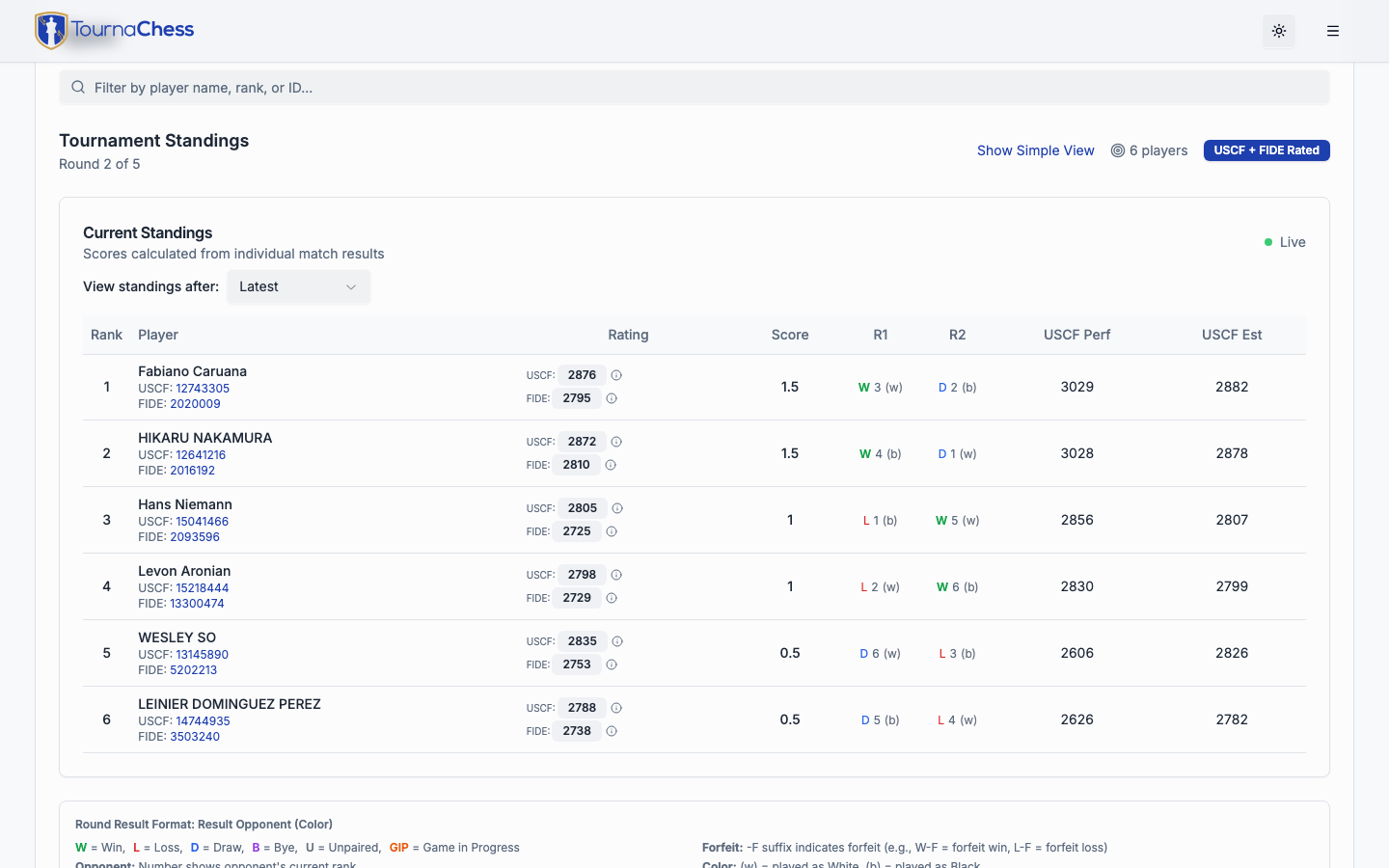
Standings update in real time as you enter results. Players following the tournament on their own devices see scores change immediately, without refreshing the page. This is one of the most appreciated features for live events -- players can check the standings board from their seats.
Text-only result display
Use Text mode on the Standings tab to replace color-coded round results with printable-style text labels. The control changes to Color mode when text is active. Browsers that report a higher-contrast preference or forced-colors mode start with text results automatically; your manual choice takes precedence for the current page session.
Upset rating comparisons
In a rated section, select Show Upsets on the Standings tab to see a rating differential beneath a lower-rated player's win or draw. This is off by default. A win shows the full rating difference; a draw shows half. The comparison uses the players' currently displayed tournament ratings for the section's pairing rating type, so it can change if those ratings are edited or refreshed. Byes, forfeits, and custom-score results do not show an upset differential. Select Hide Upsets to return to the compact view.
Tiebreak methods
If tiebreaks are enabled for a section, the standings table shows one column per configured method and uses them to rank players with equal scores. The methods are applied in the order you configured them -- the first method is the primary tie-breaker, the second is used when the first is tied, and so on. See Creating Tournaments for the full list of available methods and how to configure them.
If you have a Custom tiebreak enabled, you can edit each player's value directly in the standings table by clicking the value cell. This is useful for sportsmanship points, attendance bonuses, or other criteria you want to track manually.
Performance ratings
For USCF-rated sections, TournaChess calculates a tournament performance rating for each player. Performance ratings reflect how strongly a player performed relative to their opponents' ratings, independent of their pre-tournament rating. Forfeits are correctly excluded from performance rating calculations, so a forfeit win against a low-rated opponent does not artificially inflate a player's performance rating.
Note: The performance rating is an estimate and should not be considered official.
Estimated post-event ratings
Players can see their projected USCF rating change based on tournament results so far. These estimates use the standard USCF rating formulas and update as each round's results are entered. Estimated ratings correctly handle forfeits, distinguishing between actual game results and administrative outcomes.
Tip: Remind your players that estimated post-event ratings are projections. The actual post-event rating depends on USCF processing and may differ slightly due to other rated events the player participates in.
Team Standings
The Teams tab appears on the tournament page whenever the team / school field is in use for any section, or any player has a team on file -- including while the tournament is still a draft and registrations are arriving.
As a tournament director you always get a Standings / Roster toggle at the top of the tab. Players and spectators see the toggle only once there are standings to show: a section with team standings enabled, on an active or completed tournament. Otherwise the tab opens directly on the Roster.
Beside the toggle is the tournament's Actions menu, whose Print option prints whichever of the two views you are looking at -- so switch to the one you want on paper first. Print is greyed out when there would be nothing on the sheet -- no section with team standings enabled, or a roster with no team names on it yet.
Assigning team names to players does not by itself produce team standings -- those are a separate per-section setting (see Creating Tournaments for setup). If a section does not have them switched on, its card in the Standings view says so and offers an Enable button, which turns them on for that section and shows its standings straight away.
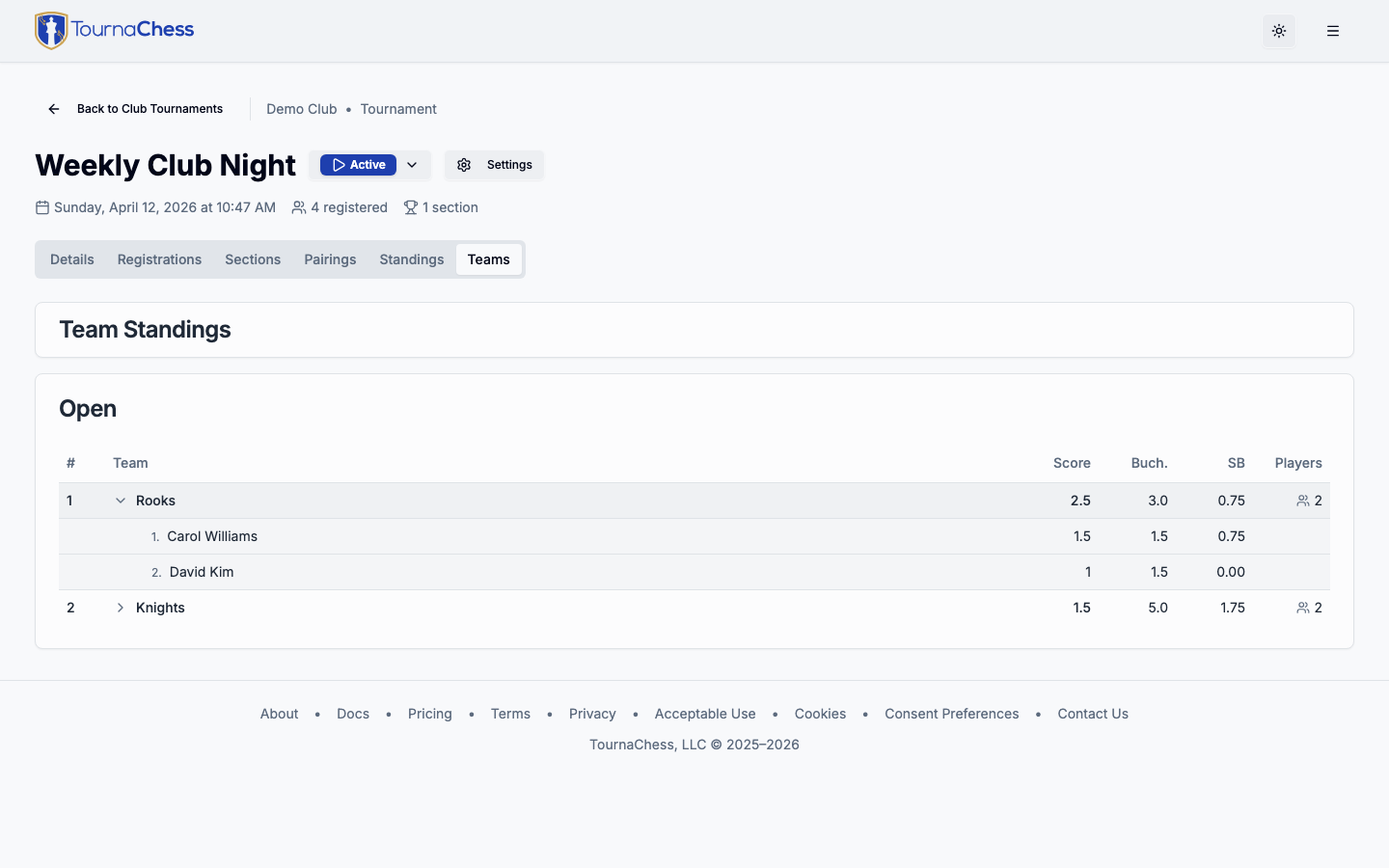
The Teams tab shows each team ranked by score. The team score is the sum of the top N individual scores from that team, where N is configured in the section settings. Tiebreaks (Buchholz and Sonneborn-Berger) are also summed from the same top players, if tiebreaks are enabled for the section.
The tiebreak columns start hidden, as they do on the Standings tab, and an Expand Tiebreaks button beside the selectors brings them back. The button appears only where the sections on screen actually configure tiebreaks. Hiding the columns never changes the order of the teams -- the tiebreaks still decide it -- so the table you get is the same ranking with fewer numbers on it.
Click any team row to expand it and see the contributing players and their individual scores. If a team has more members than the top-N count, a Show all button reveals the remaining members. Team standings update in real time alongside individual standings as results are entered.
When more than one section has team standings enabled, a By Section / Consolidated toggle appears at the top of the Teams tab. By Section ranks teams within each section separately (the default). Consolidated ranks each team using its players from every section combined, so a school whose players are split across sections (for example a K-3 and a K-5 section) is scored on its members across both. In the consolidated view each contributing player is labelled with the section they competed in.
Printing from the Standings view follows every control: the section selector (including All Sections), the By Section / Consolidated choice, and the tiebreak toggle -- so the sheet matches what is on screen. Collapse the tiebreaks before printing and the sheet carries no tiebreak columns and no legend; expand them and it carries both. Every team is printed with its full member list rather than the top N alone -- the scoring places are numbered and the players who did not count toward the team score are marked, so a coach can check the arithmetic without a Show all button to press. When the tiebreak columns are showing, a legend at the foot of the sheet explains each one.
If the section offers Team Place prizes, the trophies those standings decide are listed on the Prizes tab and the printed payout sheet rather than here. See Team place prizes.
Team Roster
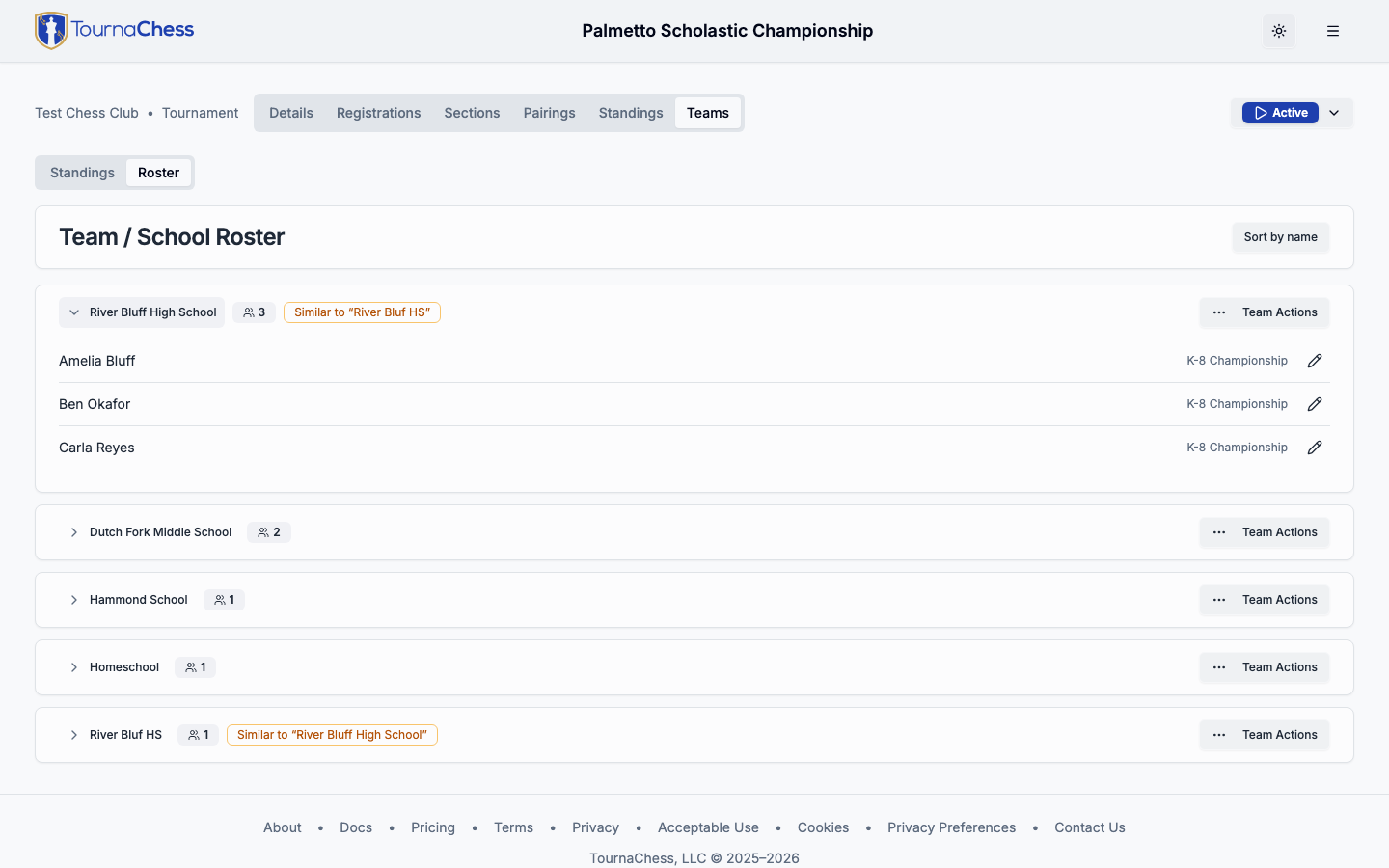
Players type their own team or school name when they register, so the same team often arrives under several spellings -- "River Bluf HS" next to "River Bluff High School", or a name that differs only in capitalization. Each variant counts as a separate team, which splits team standings and stops team pairing from recognizing teammates.
Spaces before or after the name are the one difference TournaChess settles on its own: they are stripped as a registration is saved, so a name typed with a trailing space joins the team of the same name rather than starting a second, invisible copy of it. Everything else is a judgement call, and the tools below are how you make it.
The Roster view on the Teams tab groups players by the team name they registered under, largest team first, so the one-player strays collect at the bottom where they are easy to spot. Teams that look like variants of each other are badged Similar to .... Anyone viewing the tournament can see the roster; the controls below are available to tournament directors.
As elsewhere on the tournament page, the roster lists registrations that have completed checkout. Players still awaiting payment are not shown, so a team nobody has finished paying for does not appear yet -- though bulk actions still apply to those registrations when they share a team name with a listed one.
Each team's Team Actions menu offers:
- Rename -- change the team name for every player on it at once. If you rename a team to a name that already exists, you are asked to confirm before the two are merged.
- Merge into... -- combine this team into another. Teams whose names look like this one's are offered first, under Likely the same team; the rest of the tournament's teams follow in alphabetical order. Once there are more than a handful, a search box above the list narrows it to what you type, which is the quickest way to find a particular school at a large event.
- Clear team -- remove the team from all of its players, moving them to No team. Use this for catch-all labels that are not real teams, such as a "Homeschool" entry that several unrelated players typed, so team pairing stops avoiding pairings between them. This cannot be undone.
To move a single player, expand the team and use the pencil button on their row. Both this and the team field in a player's registration details suggest the teams already in the tournament as you type, so picking a suggestion keeps the spelling consistent. They remain free-text fields, so typing a new name still creates a new team -- which is what you want when the team really is new.
Team changes always apply across every section of the tournament, and cover every registration under the name -- including withdrawn players and any still awaiting payment. The confirmation tells you how many registrations an action will change.
Renaming and merging hold for players who have not paid yet: when their checkout completes, the corrected name is already on their registration and stays. Clear team is the exception. A player who finishes paying after you clear their team is re-entered with the team they typed at checkout, so check the roster again once late payments come in and clear it a second time if it reappears.
Editing teams after rounds are paired affects future pairings and team standings only -- already-paired rounds are unaffected, and the Roster shows a reminder when that applies.
Printing from the Roster view gives you the same grouping on paper, in the sort order you have chosen, with each team's Similar to ... warning printed under its name and counted at the top of the sheet -- so you can walk the venue fixing team names away from the screen. Withdrawn players are struck through rather than dropped. As a tournament director your sheet also carries the No team group; other viewers, who do not see it on screen, do not get it on paper either.
Printing
Not every venue has a big screen, and some players prefer paper. TournaChess makes it easy to print tournament materials.
What you can print
Printing runs from the Actions menu in the top-right of the tournament page. The menu is the same on every tab, and Print always prints the tab you are looking at -- so open the view you want on paper first, then print. It is greyed out only where there is nothing to print, such as the Live Boards view.
From the tournament page, you can print:
- Entry lists -- All registered players with their ratings and section assignments.
- Pairings -- Board numbers, matchups, and color assignments for any round.
- Standings -- Current or final standings with scores and tiebreak values.
- Teams -- Team standings or the team roster, from the Teams tab's Actions menu. See Team Standings and Team Roster above for what each sheet carries.
- Prizes -- Prize distribution for any section with awards to hand out, including each winner's award, amount paid, and payment status. Any tournament-wide prize is printed as its own table above the sections, since that is where it is paid from, and can be printed on its own from that card's Event Actions menu. Available to Tournament Directors, Admins, and Owners from the Prizes tab. See Prize Calculation for details.
A tournament director can opt in to Publish prizes in the tournament's Prizes settings. When enabled, visitors see award labels and winners on the public tournament page, and the same prize summary is included in the public tournament API response. It is off by default; payout amounts, payment status, and TD notes remain private.
Section options
Choose to print all sections combined on a single printout, or select per-section output to print each section separately. Per-section printing is useful for posting section-specific sheets at different areas of the venue.
Formatting
Print output is formatted for standard letter-size paper (8.5 x 11 inches) with clean typography and appropriate margins. Pairings and standings use a table layout that is easy to read at a glance. If your sections are large, the printout automatically flows to multiple pages.
Tip: Print an extra copy of the pairings to keep at the TD table. It makes result entry faster when you can glance at the paper to confirm board numbers as players report their results.
Quick Reference: Round-by-Round Workflow
Here is the typical workflow for each round, summarized:
- Review the entry list -- Handle any last-minute additions, withdrawals, or BYE changes.
- Generate pairings -- Click the button. The engine does the work.
- Review pairings -- Check for any issues. Make manual adjustments if needed.
- Confirm the round -- Click Confirm Round to lock in pairings and begin play.
- Enter results -- As games finish, record outcomes with 1-click entry.
- Check standings -- Verify that standings look correct before moving on.
- Repeat -- Generate pairings for the next round and start again.
After the final round, review the final standings, print results for display, and export data for USCF and/or FIDE submission if you are running a rated event. For details on exporting, see Results Export.
What's Next
Now that you know how to run a tournament from start to finish, explore these related guides:
- Creating Tournaments -- Detailed configuration options for sections, board numbering, tiebreaks, and BYE settings.
- Registration & Payments -- Set up entry fees, custom registration fields, and payment tracking.
- Ratings Overview -- Deep dive into rating lookups, membership validation, and results export for USCF, FIDE, and NWSRS.
- TV & Projector Displays -- Configure auto-refreshing venue displays with QR codes for players.
- Recurring Series -- Automate tournament creation for weekly or monthly club events.
Still have questions? Visit our Contact page to get in touch with TournaChess support.