

Ratings Overview
TournaChess integrates with USCF (US Chess), FIDE, and NWSRS (Northwest Scholastic Rating System) to bring official ratings, membership validation, and results export into your tournament workflow. It can also pair a section on players' Chess.com and Lichess ratings, for events that are not submitted for official rating at all. Each rating system has its own detailed guide -- this page covers the shared concepts: rating types, results export, and common questions.
Rating Types
Every section in a TournaChess tournament has a rating type that determines how ratings are used for pairings, display, and results reporting. You set the rating type when you create or edit a section, so a single tournament can mix rated and unrated sections to accommodate different player groups.
Unrated
No rating requirements and no results submission. Players do not need a USCF or FIDE ID to register. This is the right choice for casual club nights, scholastic fun events, or any situation where official ratings are not needed.
USCF-Rated
Official USCF ratings are used for pairings and displayed throughout the tournament. When players register with a USCF ID, TournaChess automatically looks up their current rating. After the tournament, you can export results in USCF format for submission to US Chess. Players should have an active USCF membership to participate in USCF-rated sections. See the USCF Integration guide for details.
FIDE-Rated
FIDE ratings are displayed and used for pairings. Players register with their FIDE ID, and TournaChess retrieves their FIDE standard, rapid, or blitz rating depending on the section's time control. After the event, you can export results in TRF16 format for submission to your national federation. See the FIDE Integration guide for details.
NWSRS-Rated
NWSRS ratings are used for pairings and displayed throughout the tournament. When players register with an NWSRS ID, TournaChess looks up their current rating from the local NWSRS database. NWSRS-rated sections are designed for events in the Pacific Northwest region where players are tracked in the Northwest Scholastic Rating System. Despite its name, NWSRS tracks both scholastic and adult players. See the NWSRS Integration guide for details.
Online-Rated
Ratings are pulled from players' Chess.com and Lichess.org accounts and used for pairings, seeding, and display. You choose an ordered list of rating sources -- for example Chess.com Rapid, then Lichess.org Rapid -- and each player's rating is the first source in that list they actually have a rating in. Online-rated sections are not submitted to any federation, so no USCF or FIDE ID is needed. See the Online Ratings guide for details.
USCF+FIDE Dual-Rated
Both rating systems are active in the same section. TournaChess retrieves and displays both USCF and FIDE ratings for each player. You can configure which rating system the Swiss pairing algorithm uses for seeding -- USCF or FIDE -- on a per-section basis. The default for dual-rated sections is USCF. See the FIDE Integration guide for details on dual-rated configuration and export.
USCF+NWSRS Dual-Rated
Both USCF and NWSRS ratings are active in the same section. TournaChess retrieves and displays both ratings for each player. You can configure which rating system the Swiss pairing algorithm uses for seeding -- USCF or NWSRS -- on a per-section basis. The default for dual-rated sections is USCF. See the NWSRS Integration guide for details.
Tip: Rating type is set per section, not per tournament. This means you can run an Open section as USCF+FIDE dual-rated, a Scholastic section as NWSRS-rated, an Online section paired on Chess.com ratings, and a Beginners section unrated, all within the same tournament.
Results Export
After your tournament is complete, TournaChess generates export files that you can submit to the appropriate rating organization for official processing. The available export formats depend on the section's rating type.
Export Formats
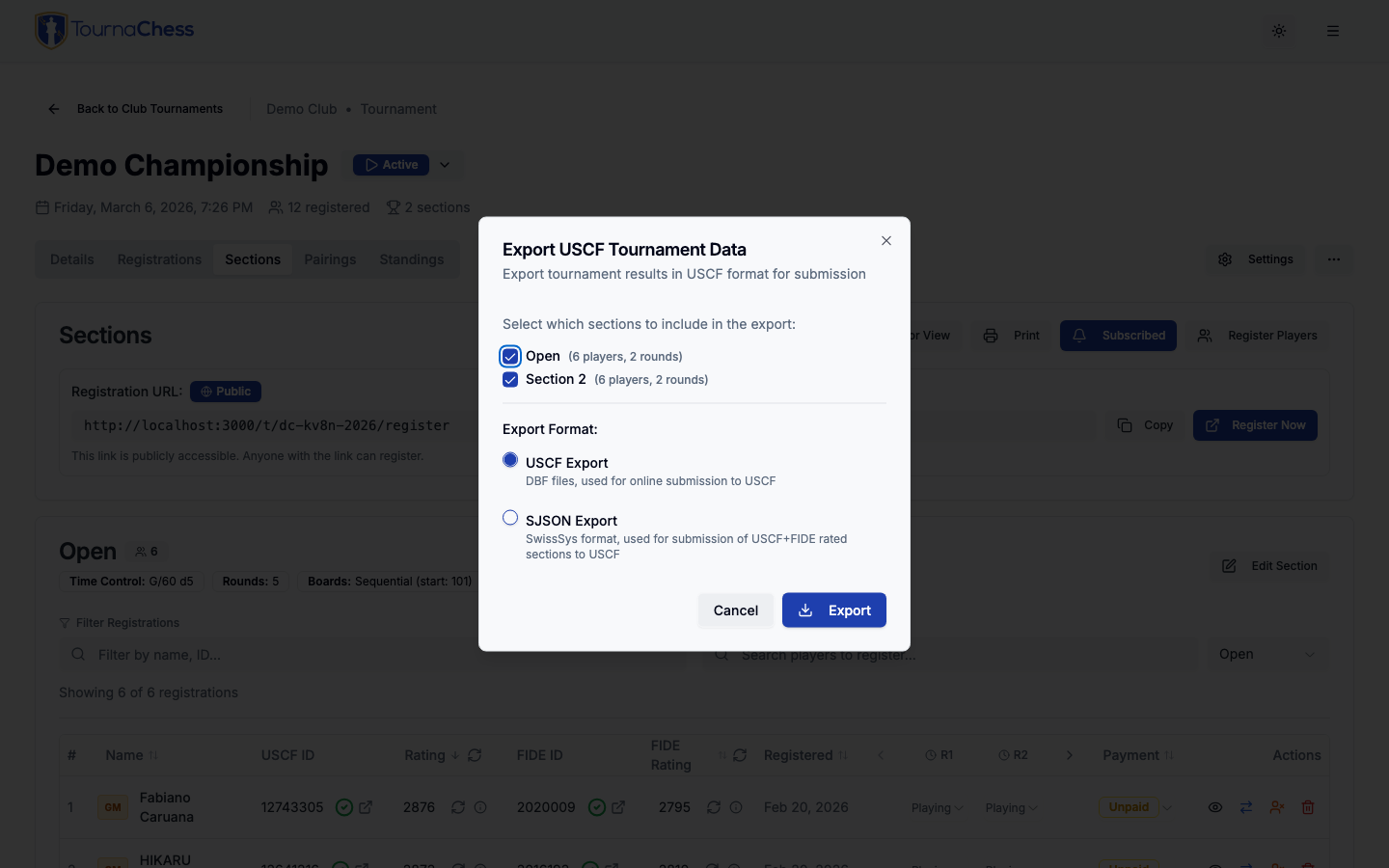
- USCF Export -- DBF files in a ZIP archive, the standard format for the USCF online submission portal. See the USCF Integration guide.
- SJSON Export -- A file format that SwissSys can load. Used for USCF+FIDE dual-rated validation and for submitting results to NWSRS. See the FIDE Integration and NWSRS Integration guides.
- TRF Export -- TRF16 (Tournament Report Format), the standard for FIDE tournament reporting. See the FIDE Integration guide.
How to Export
- Open your tournament. The Actions menu is the same on every tab, so it does not matter which one you are on.
- Choose Actions → Export → Export Results.
- Select which rated sections to include.
- Choose your export format.
- Click Export. You will download one or more files, depending on the format chosen.
What's Included in the Export
Every export file contains:
- Tournament information: Event name, dates, location, USCF affiliate ID, and organizing officials (chief TD, assistant TDs).
- Section details: Section names, time controls, rating systems, number of rounds played, and scholastic level indicators.
- Player records: Names, rating IDs (USCF, FIDE, and/or NWSRS depending on section type), pre-tournament ratings, state of residence, and provisional status.
- Round-by-round results: For each round, the opponent's pairing number, the player's color (white or black), and the game result (win, loss, draw, bye, forfeit, or unplayed).
- Scores and statistics: Total scores, tie-break values, performance ratings, and estimated post-event ratings.
Frequently Asked Questions
Can I change a section's rating type after players have registered?
It is best to set the rating type when creating the section. Changing the rating type after players have registered may cause inconsistencies with rating data and membership validation. If you need to make a change, review all registrations afterward to ensure the data is complete and correct.
Related Guides
- USCF Integration -- Rating lookups, membership validation, rating calculations, and USCF event import.
- FIDE Integration -- FIDE ID validation, titles, compliance, and dual-rated events.
- NWSRS Integration -- Scholastic ratings for the Pacific Northwest.
- Getting Started -- Learn how to link your USCF and FIDE IDs to your TournaChess profile.
- Creating Tournaments -- Detailed tournament configuration options including sections, entry fees, and rating setup.
Still have questions? Visit our Contact page to get in touch with TournaChess support.