

Player Guide
Whether you are a seasoned tournament player or sitting down for your first rated game, TournaChess makes it easy to register, follow along, and review your results. This guide walks you through every step of the tournament experience, from registration to checking your final standings.
Registering for a Tournament
Your tournament director or chess club will share a registration link for the event -- you might receive it in an email, a group chat, or posted on a flyer at your local club. Click the link and you are taken straight to the registration page, which shows the event details, available sections, and entry fees.
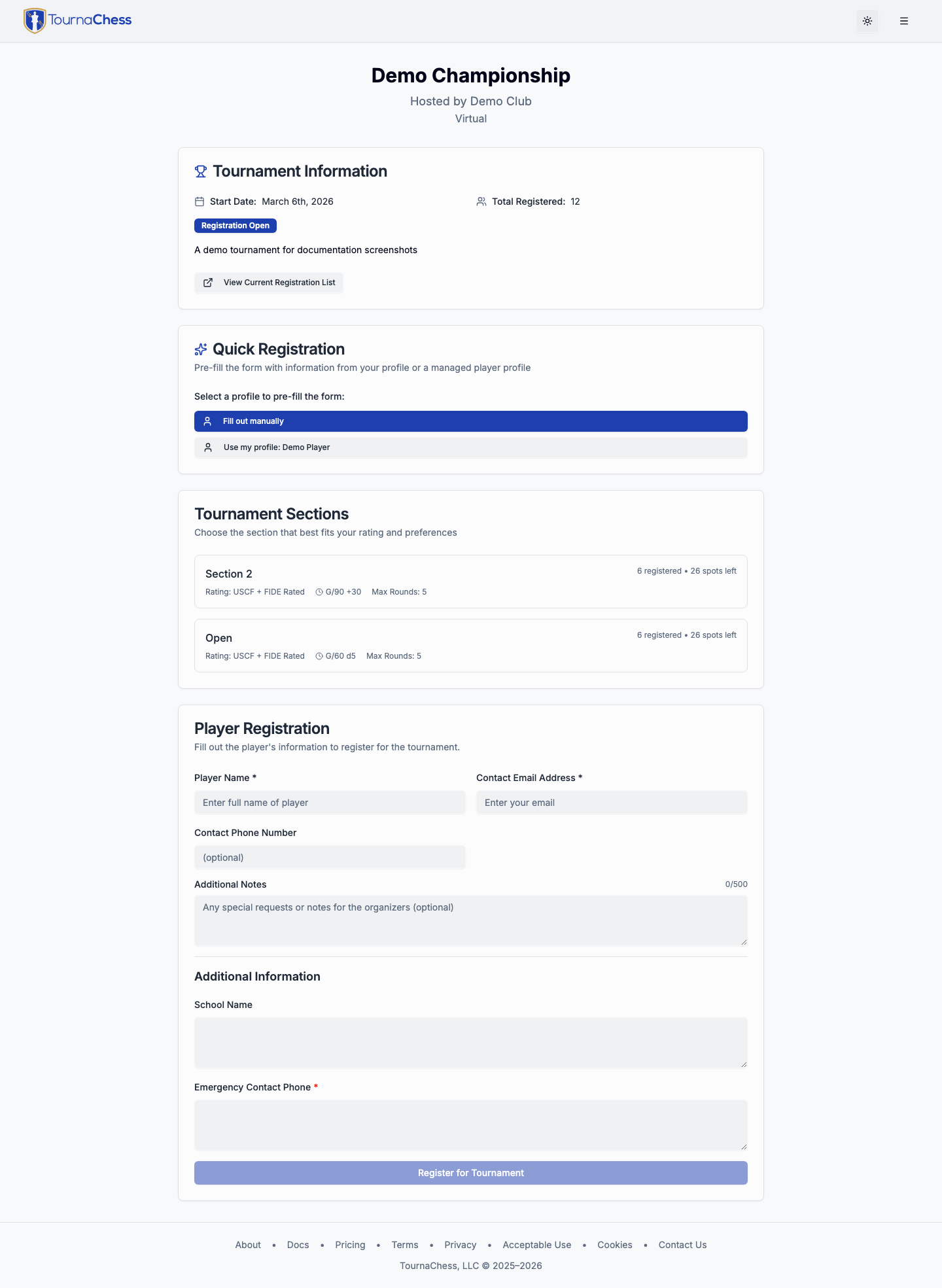
Fill out the form and you are in. What you see depends on how the organizer has configured the event.
Some events have no sign-up form at all. If the page says Registration Handled by the Directors, the organizers add every player themselves -- contact the hosting club and ask to be added. You can still open the tournament page to follow pairings and standings.
Guest Registration
Guest registration means using an event's public registration form without creating or signing in to a TournaChess account. For most events, you can follow the organizer's link, enter your name and email, add an optional USCF or FIDE ID, and complete registration as a guest. This is especially convenient if you are a walk-in or visiting a club for the first time.
Organizers can narrow this per event: some are limited to members of the hosting club, and some have no self-registration at all.
Registered User Registration
If you have a TournaChess account, signing in before you register has some advantages:
- Your name and chess IDs are filled in automatically.
- Anything else you have saved -- such as your answer to the Gender question, when an event asks it -- is filled in too, so you do not answer it again for every tournament.
- You are able to register for tournaments that have been marked as private to members of a TournaChess club.
Choosing a Section
Most tournaments have one or more sections based on rating or skill level. During registration you will choose which section to play in. Common examples include:
- Open -- anyone can enter regardless of rating
- Under 1600 -- for players rated below 1600
- Under 1000 -- for players rated below 1000
If you are unsure which section is right for you, ask your tournament director. They can help you find the best fit.
A section marked FULL has no seats left. One marked Closed is being held shut by the organizer -- often because it opens later, which the section's description usually explains. Neither can be selected; contact the tournament director if you believe you belong in that section.
Custom Fields
Some tournament organizers include additional questions on the registration form. You might be asked for an emergency contact number, your school name, a t-shirt size, or other event-specific information. Required fields are marked clearly, so you will know what is needed.
Team or School
Your section may include a field labeled Team, School, Club, or something similar. Read the note beneath it: the organizer can explain exactly what to enter and whether the information is used for pairing avoidance or team standings. Players who should be kept apart, such as family members or close friends, may be asked to enter the same team name.
If the field says it is optional and you do not have a team or school, leave it blank rather than entering "None." If the field is required, you must enter a value before completing registration.
Payment
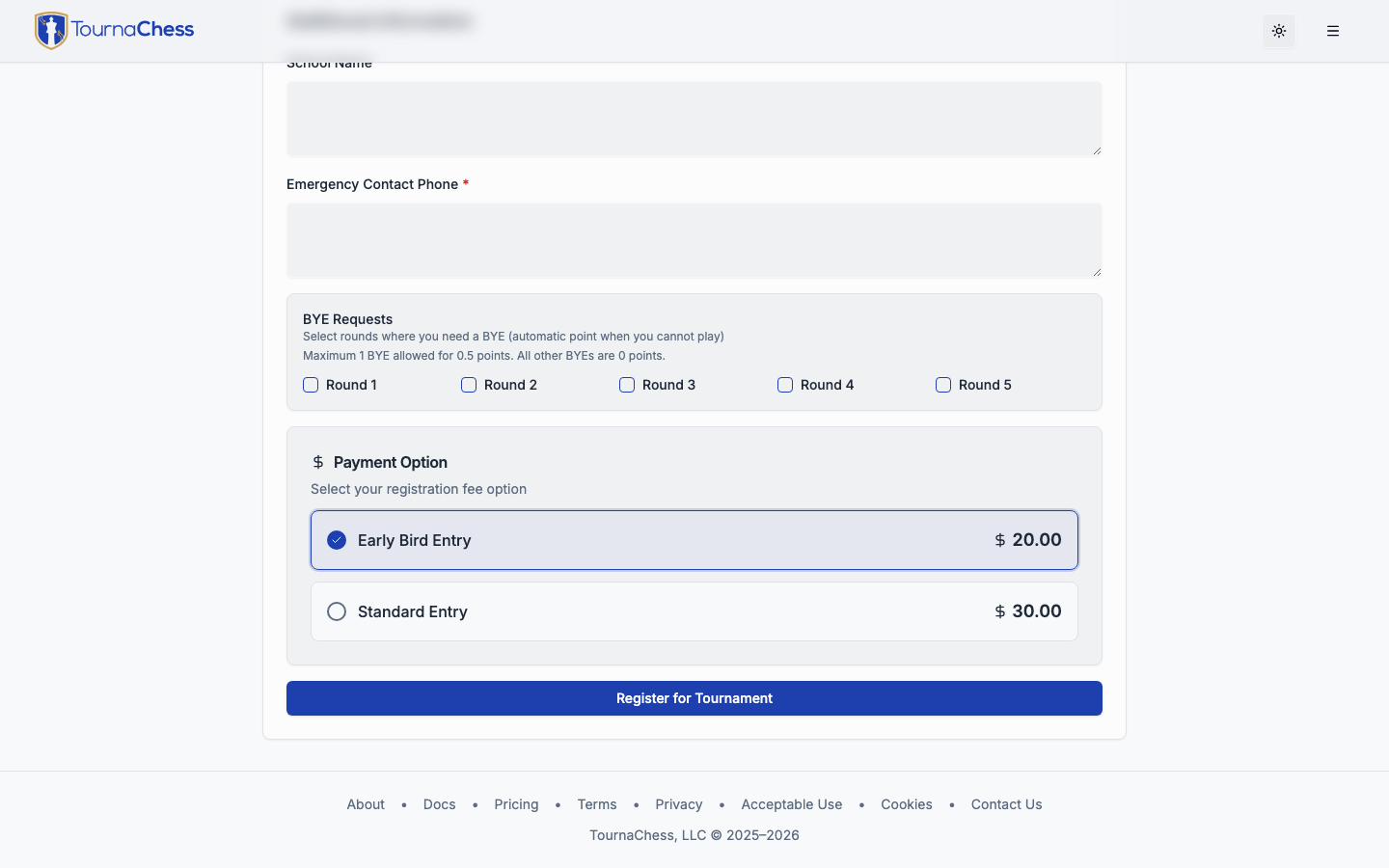
Some tournaments charge an entry fee. If there is a fee, you will see the amount displayed during registration before you complete the process. There are no surprises.
Online Payment
TournaChess uses Stripe for secure online payment. You can pay with any major credit or debit card. The payment happens right on the registration page -- enter your card details, confirm, and you are done.
Promo Codes
If your organizer gave you a discount code, enter it in the Promo Code box below the entry options and click Apply. The box only appears on events that have a code to give, so most registration forms will not show one. The page shows what the code takes off and your new total before you pay -- capitalization does not matter. If the code covers the whole entry fee, the payment step disappears and you are registered right away.
A code applies to the entry option you have selected, so pick your section and entry option first. Only one code can be used per registration.
If you change your section, entry option, or selected rounds after applying a code, the discount has to be worked out again against the new price. The page says so and holds the register button until you press Apply once more -- so a change never quietly costs you the discount. Clear the box instead if you would rather register at the full price.
In-Person Payment
Some organizers allow you to pay at the venue instead of online. If this option is available, you will see it during registration. Select the in-person payment option and settle up with the tournament director when you arrive.
Confirmation
After you register, you will receive an email confirmation with a summary of your registration. The confirmation includes the event name, the section you entered, and your payment status. If the event lets you sign up for individual rounds, the email lists the date and time of each round you chose -- so check those, not the event's start date, for when to turn up. Keep this email handy in case you need to reference it later.
Note: If you do not see a confirmation email, check your spam folder. If it is still missing, view the registered players list on the tournament page to verify your registration went through.
Before the Tournament
Once you are registered, the tournament page becomes your go-to resource for pre-event information.
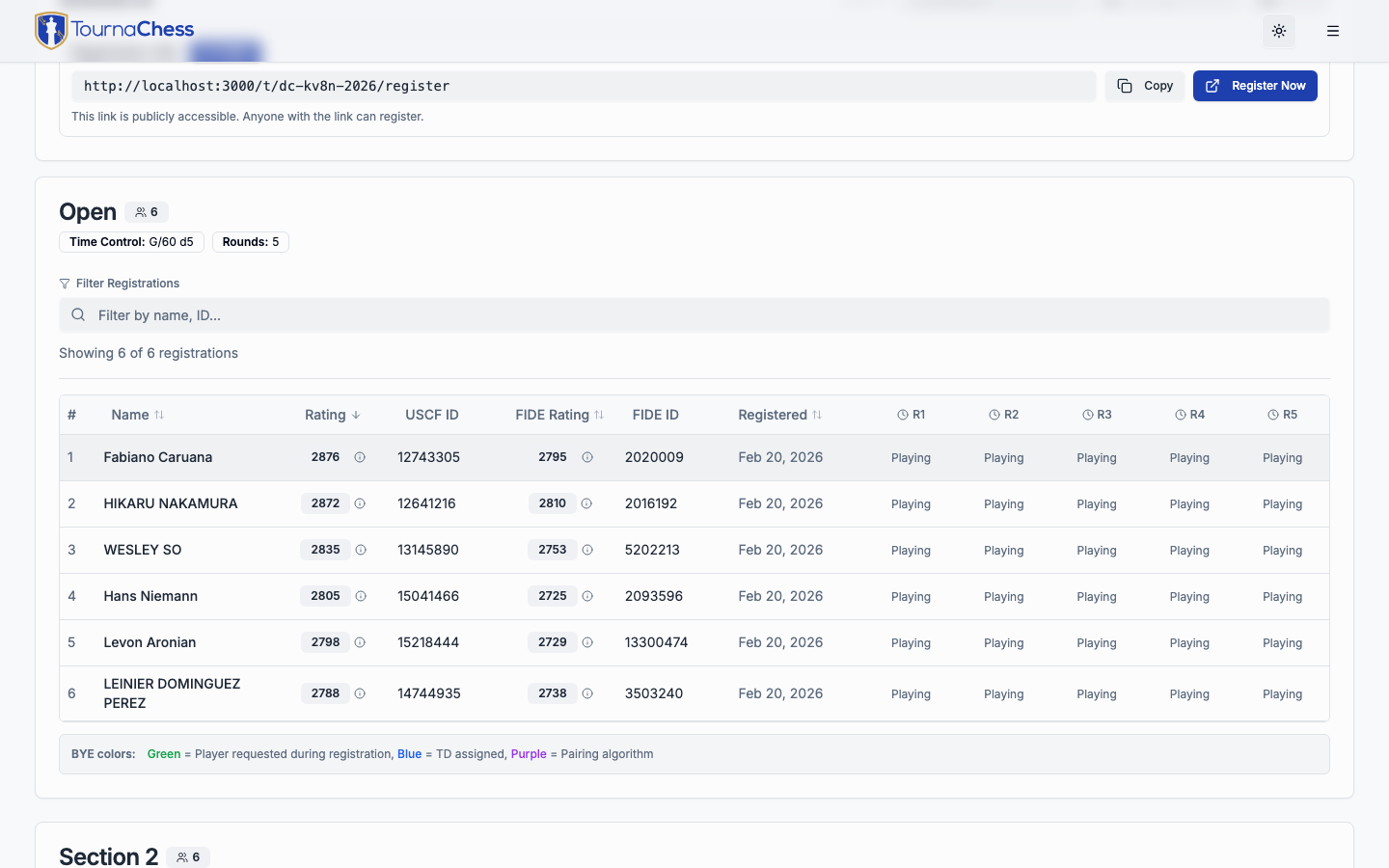
Viewing the Entry List
The entry list shows all registered players along with their ratings and sections. This is a great way to see who else is playing and get a sense of the field.
Requesting Byes
If you know you will miss a specific round, many tournaments allow you to request a bye in advance. A bye means you sit out that round and may receive a partial point (typically a half-point), depending on the tournament rules. Request your byes during registration if possible. There will be a section for that if bye requests are allowed. Contact your tournament director if you need to request a bye after you have registered.
Tip: Request byes as early as possible. It helps the tournament director plan pairings and keeps the event running smoothly.
Withdrawing
Plans change. If you can no longer attend, you can withdraw your registration any time before the tournament ends by clicking the Withdraw from this tournament button in your registration confirmation email -- it takes you straight to a confirmation page, no account or sign-in required. If the event has an entry fee and you need a refund, contact your tournament director directly.
Some tournaments turn off self-withdrawal. If your confirmation email does not include a Withdraw from this tournament button, contact your tournament director and they can withdraw you.
During the Tournament
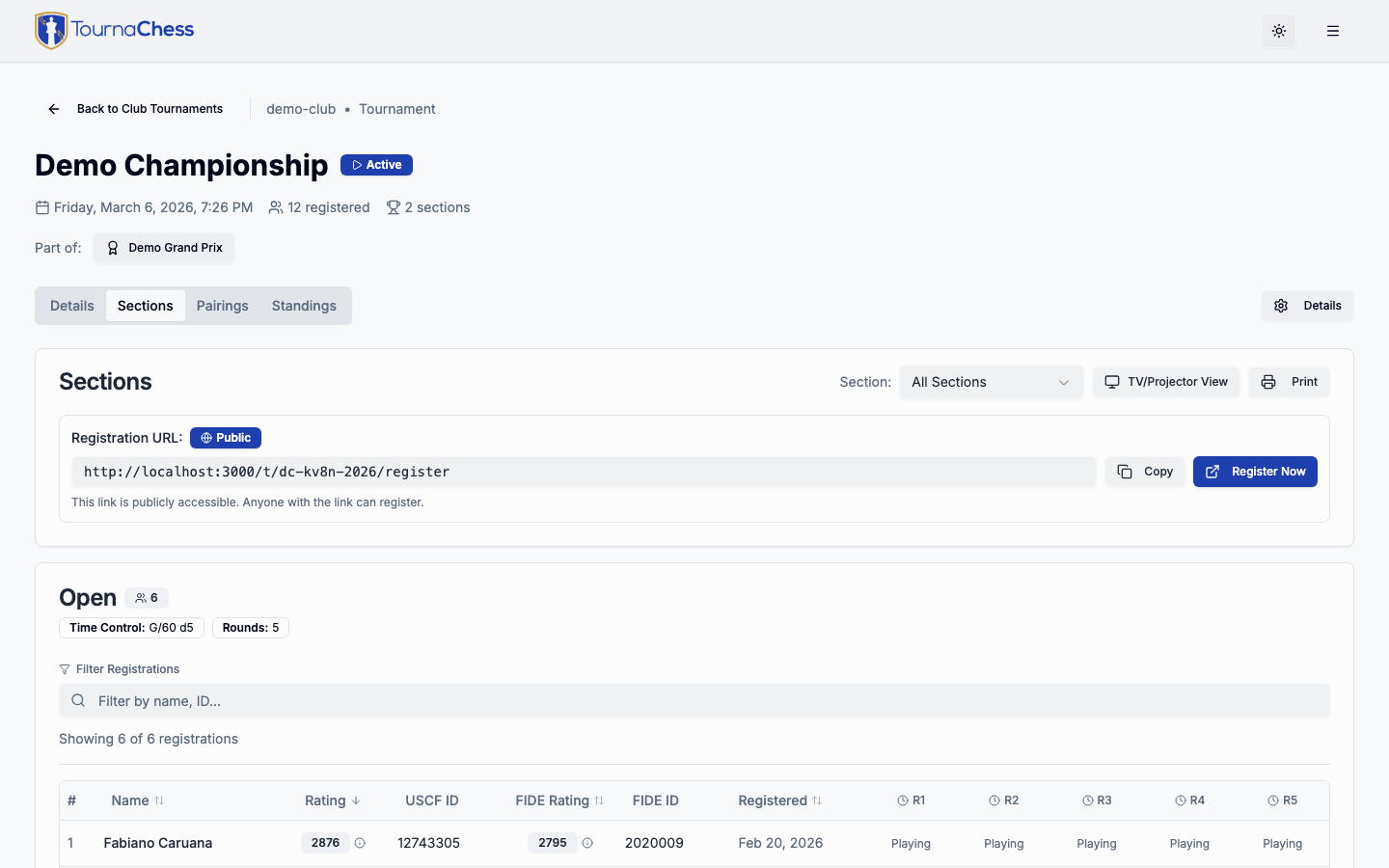
This is where things get exciting. TournaChess keeps you informed in real time as the tournament unfolds. The tournament page is your home base throughout the event -- check it for pairings, standings, and round updates.
Viewing Pairings
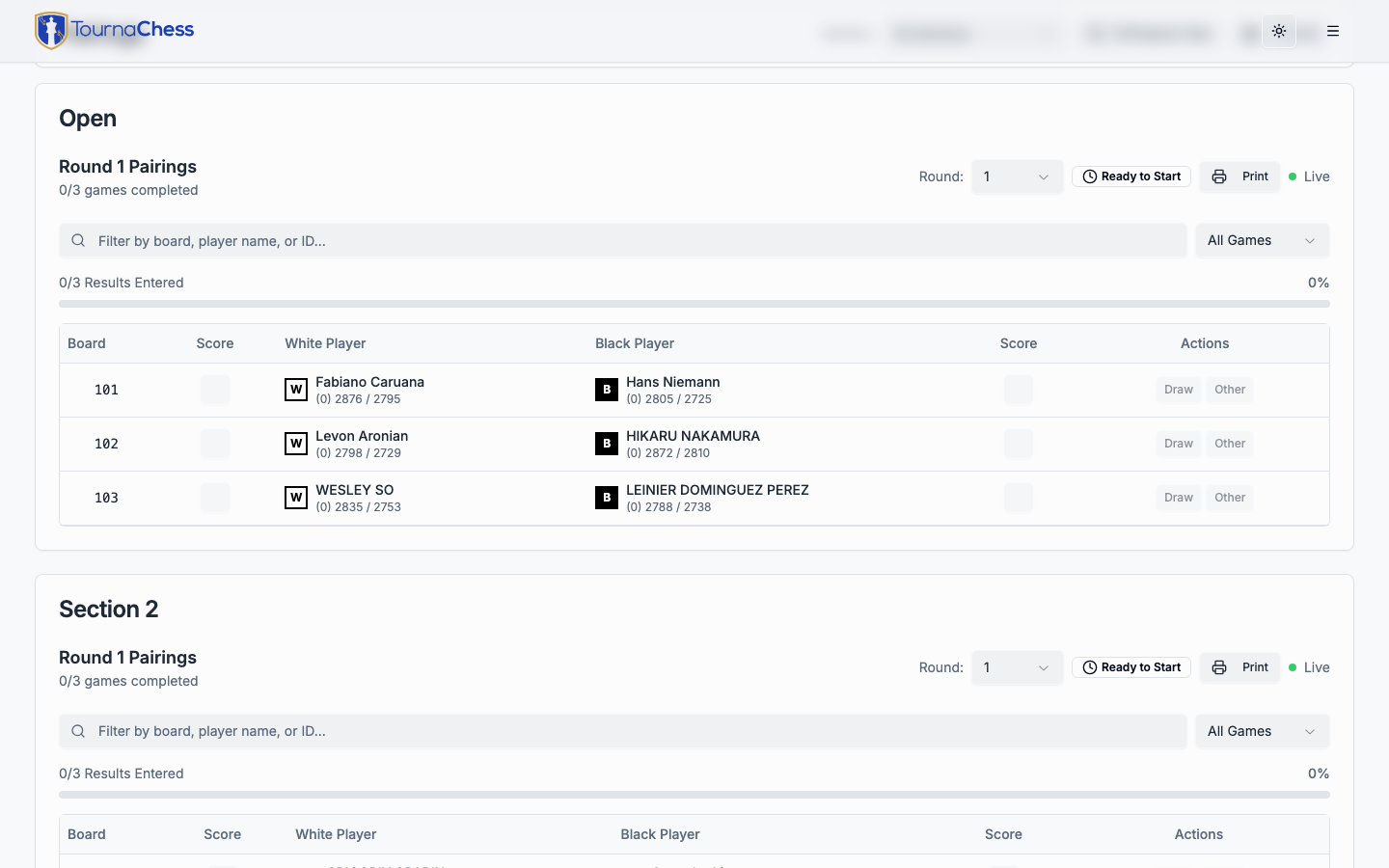
When the tournament director starts a round, the pairings appear on the tournament page. Your pairing tells you three things:
- Board number -- which board to sit at
- Opponent -- who you are playing
- Color -- whether you have the White or Black pieces
Find your name in the pairings list, head to your board, and shake hands. If you are not sure where to sit, look for board numbers posted at the tables or displayed on the venue screen.
In a large section, use the filter box above the list: type your name, your board number, your rating-system ID, or your team / school name. Filtering by team shows every board your school is playing on, which is handy for coaches and parents following several players at once.
Pairing Notifications
You do not have to keep refreshing the tournament page -- TournaChess can notify you the moment each round's pairings are posted. Notifications are opt-in and require a TournaChess account, and there are two ways to turn them on:
Account notification settings cover all of your tournaments at once. Enable email or text notifications in your account settings and you will be notified for every event you (or the family player profiles you manage) are registered in -- each message names the player it is about, with the board number, color, opponent, and a link to the tournament page.
Subscribe to Pairings covers a single tournament. Use it to get notified for just one event without changing your account-wide settings, to follow another player, or to use a different email address or phone number for that event. Email notifications are always free. For text messages:
- Sign in to TournaChess and open the tournament page
- Open the Actions menu and choose Subscribe to Pairings
- Pick the player (or players) you want to follow
- Check Text message, enter your mobile number, and save
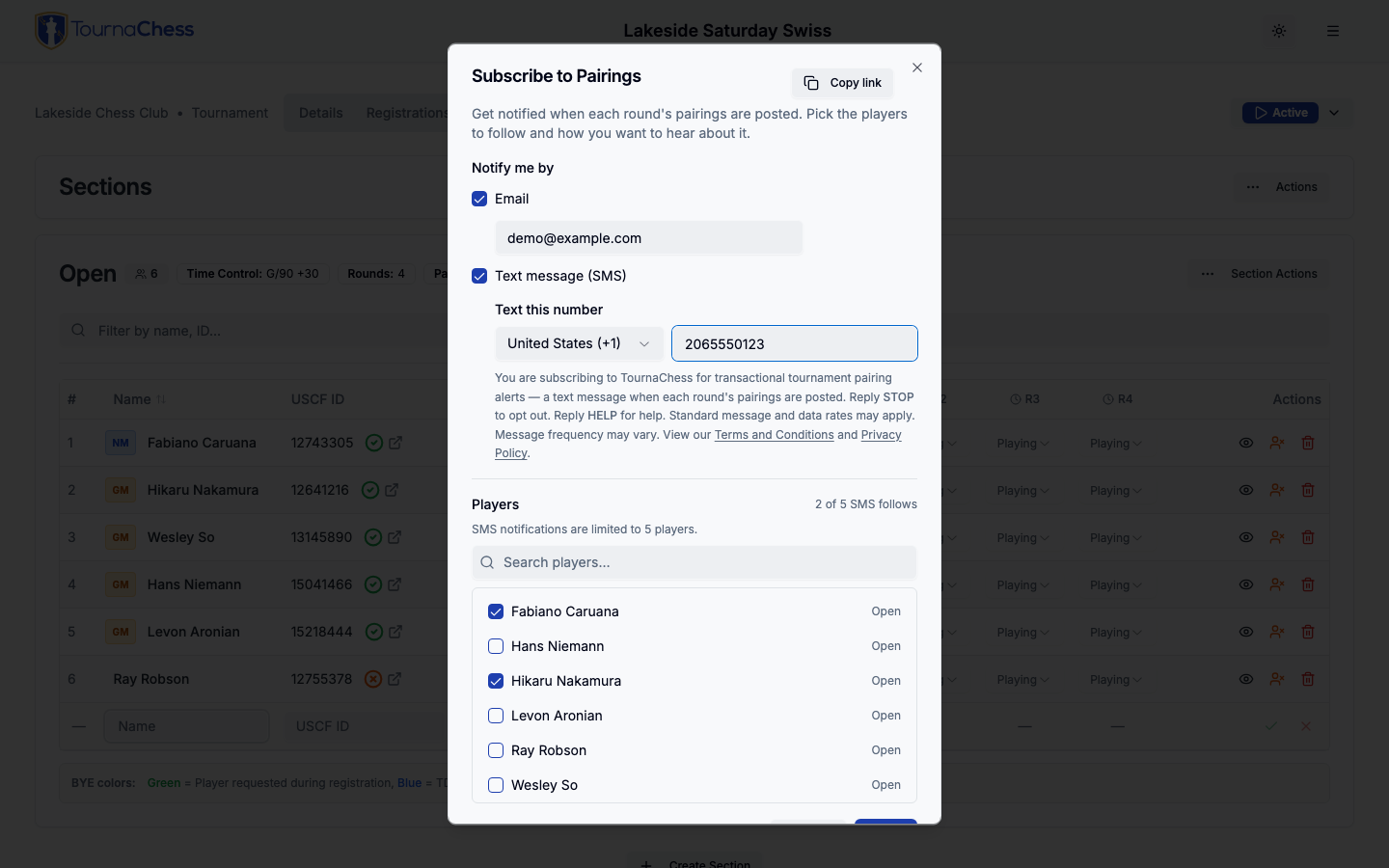
Sharing the shortcut. The dialog's Copy link button copies a link that opens it directly, so organizers can point players straight at it from a newsletter, a club website, or a QR code instead of walking them through the Actions menu. Anyone who follows the link and is not signed in is asked to log in or sign up first, then lands back on the dialog.
A few things to know about SMS notifications:
- You can follow any player in the tournament, not just yourself -- handy for parents tracking their kids or coaches tracking students. One phone can follow up to 5 players per tournament.
- SMS is supported for US and Canadian phone numbers.
- Reply STOP to any message to stop all texts; reply START to resume.
- Not every tournament offers SMS -- it depends on the organizing club. Email notifications are always available.
Note: Pairing notifications go to signed-in TournaChess accounts. If you registered as a guest, you can still be reached: when your account (or one of your family player profiles) lists the same USCF, FIDE, or NWSRS ID as your registration, your account notification settings apply to it automatically. Otherwise, create a free account and use Subscribe to Pairings to follow your own games.
Tip: The same dialog also lets you follow players by email. Subscribe to a friend's pairings and you will both know where they are sitting before they do.
Live Standings
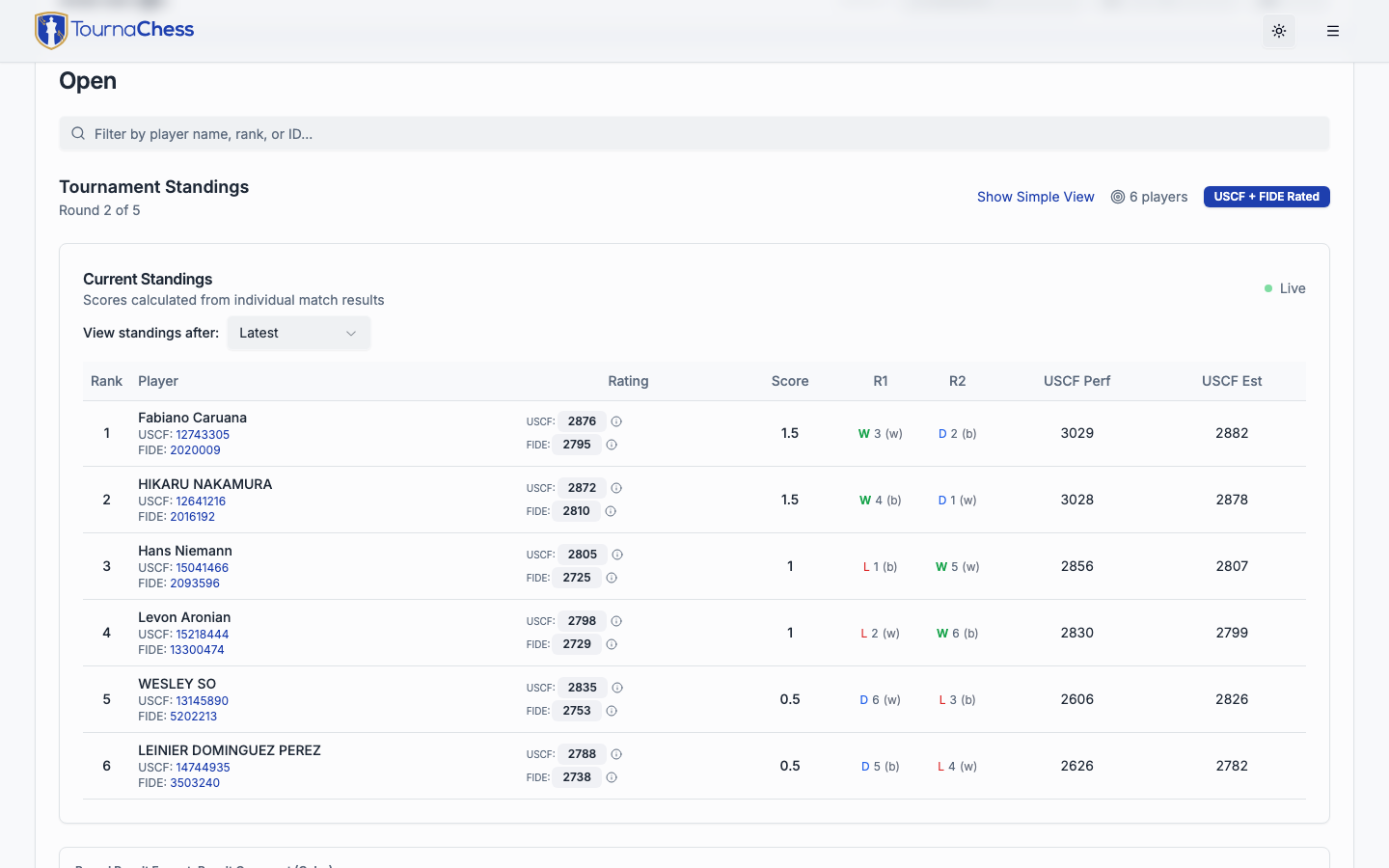
Standings update in real time as the tournament director enters results. After each round, you can check your score, your tiebreak points, and where you stand in the field. There is no waiting for a printout -- just refresh the tournament page on your phone.
If the tournament collects a team or school, a Teams tab appears. When team standings are enabled it shows how your team ranks against others, and you can expand any team to see who is contributing to the team score. Its Roster view groups players by the team they registered under, so you can check that you and your teammates are all entered under the same name -- if one of you is listed separately, ask the tournament director to merge it. Anyone whose entry fee is still unpaid does not appear here yet, so give a missing teammate time to finish checking out before flagging it.
QR Codes at the Venue
Many tournament directors display a QR code on a projector or TV screen at the venue. Scan it with your phone's camera to jump straight to the tournament page. From there you can view pairings, standings, and the round schedule without needing to find the link in your messages.
After the Tournament
When the final round wraps up, the tournament page becomes a permanent record of the event.
Final Standings and Results
View the complete final standings including every player's score, tiebreak points, and final placement. You can also see a round-by-round breakdown of results -- who played whom, what the results were, and how the standings evolved.
Rating Updates
For USCF-rated events, your tournament director submits the results to the US Chess Federation. Your official rating will typically update within a few days of submission. You can check your updated rating on the USCF website.
For FIDE-rated events, a similar process applies. Your tournament director submits results to FIDE, and your FIDE rating updates according to the FIDE calendar (usually monthly).
Note: Rating updates are handled by USCF and FIDE, not by TournaChess. Contact your tournament director with any questions about the expected timeline for submitting results to these organizations.
Performance Ratings
The tournament page may display your performance rating for the event. A performance rating reflects how you played relative to your opponents' ratings in that specific tournament. It is a useful snapshot even if your official rating has not updated yet.
Following a Club's Schedule
You do not have to keep checking a club's page to see what is coming up. A public club's page has a Subscribe button next to its Calendar shortcut -- and so does its Events page when you switch it to Calendar view -- which adds the club's public schedule to the calendar app you already use. You do not need an account, and you do not need to be a member of the club.
- Add to Google Calendar is the one-click option. Google asks you to confirm the new calendar, and from then on the club's tournaments sit alongside your own.
- For Apple Calendar, Outlook, or anything else that can subscribe to a calendar by URL, use Copy URL and paste the address into that app's "subscribe by URL" option. Open in my calendar app hands the feed straight to a desktop calendar app instead.
After that it looks after itself. Your calendar app re-checks the feed on its own -- Google does so a few times a day -- so tournaments the club adds, reschedules, or cancels turn up without you re-adding anything. Weekly club nights and other events with per-round registration appear as one entry per scheduled round rather than one long block, so you can see exactly which nights are running.
What you get is what the club has made public: an event the organizers have not published yet, or have deliberately kept off the calendar, is not in the feed. A club that has been marked private has no Subscribe button and no feed at all. If an event you expected is missing, ask the organizers rather than assuming it was cancelled.
Note: Subscribing shows you the schedule; it does not sign you up. You still register for each event you want to play, through its registration page.
Account Features for Players
While you can participate in tournaments without an account, creating one unlocks several convenient features.
Your Home Dashboard
When you sign in, your home page is a personal dashboard that pulls together everything relevant to you:
- Next up -- your next upcoming tournament, front and center, with quick access to its page.
- Upcoming and past tournaments -- the events you are registered for, split into what is coming and what is finished. This always covers all of your player profiles, so a parent managing several children sees everyone's tournaments in one place.
- Your ratings -- ratings grouped by provider, including USCF, FIDE, and NWSRS alongside your online ratings from ChessKid, Chess.com, and Lichess. If you manage profiles for family members, a player selector lets you choose whose ratings to view.
- Recent results -- a snapshot of how your latest games went.
- Your clubs -- the clubs you belong to, for jumping straight to their pages.
Account Settings
From your account settings you can:
- Update your name and email address
- Add or change your USCF ID, FIDE ID, or Chess.com account
- Set your answer to the Gender question, which some events ask for membership paperwork or for prizes such as Best Female Performance. It is optional, one of the answers is Prefer not to answer, and it is only ever visible to the tournament directors of events you register for -- never on any public page. Saving it here fills the question in for you when an event asks it; registering for an event never changes what is saved here.
- Create and manage player profiles for family members (useful if you are a parent registering children for tournaments). Each profile carries its own answer to the Gender question.
Each player profile shows how many tournaments that player has entered. Click the count to see the list and jump to any of those tournaments. A tournament is included whether you registered the player yourself or the entry simply carries their USCF, FIDE, or NWSRS ID -- so events a tournament director entered on your behalf show up too.
Profiles you have registered for a tournament cannot be deleted, because those entries are part of the permanent record of the event. You can still edit the profile's name and chess IDs at any time.
Account Deletion
You have full control over your data. If you want to delete your account, you can do so at any time from your account settings. When you delete your account:
- All personal information (name, email, chess IDs) is permanently removed
- Tournament results remain in the historical record for rating integrity
- This action is irreversible, so make sure it is what you want before confirming
Frequently Asked Questions
Do I need an account to play in a tournament?
No. You can register as a guest for any tournament that is open to anyone. An account is optional but gives you features like automatic form filling and pairing notifications by email or text. Two exceptions: tournaments limited to club members require an account that belongs to that club, and some tournaments have no sign-up at all because the directors add every player themselves.
The tournament page says "Registration Handled by the Directors" -- how do I get in?
There is no sign-up form for that event, for anyone. The tournament directors add every player themselves. Contact the hosting club and ask to be added. You can still open the tournament page to follow pairings, results, and standings.
How do I keep track of my club's upcoming tournaments?
Subscribe to the club's calendar. The Subscribe button on a public club's page adds its schedule to Google Calendar, Apple Calendar, Outlook, or whatever else you use, and it keeps itself up to date as the club adds or moves events. See Following a Club's Schedule.
How do I know what section to enter?
Check the section descriptions on the tournament page. They usually list a rating range or eligibility requirement. If you are still unsure, ask your tournament director -- they will point you to the right section.
What if I need to leave early?
Let your tournament director know as soon as possible. They can withdraw you from future rounds. Depending on the tournament rules, you may receive a zero-point bye or a forfeit for any unplayed rounds.
Can I register for a tournament after it has started?
This is up to the tournament director. TournaChess supports it. Check with your tournament director if you are unsure.
How do I find my board number?
Your board number is listed in the pairings on the tournament page. At the venue, boards are typically numbered with table tents or labels. You can also check the venue display screen if one is available.
How do I get a text message when pairings are posted?
Sign in, open the Actions menu on the tournament page, and choose Subscribe to Pairings. Select the players you want to follow, check the text message option, and enter your mobile number (US and Canada only). See Pairing Notifications for details. If you do not see a text message option, the organizing club has not enabled SMS for that tournament -- email notifications still work.
What is a bye?
A bye is a round where you do not play a game. There are different types:
- Requested bye -- you asked to sit out a round, and the tournament director granted it (usually worth a half-point, but policies vary)
- Pairing bye -- the tournament has an odd number of players, so one person sits out (usually worth a full point)
- Zero-point bye -- you requested a bye beyond the limit allowed by tournament rules to earn a 1/2 point, so you receive a zero-point bye instead.
Your tournament director determines bye policies for each event.
I registered but did not get a confirmation email. What do I do?
First, check your spam or junk folder. If the email is not there, visit the tournament page and check the entry list to see if your name appears. If you are listed, your registration went through. If not, contact your tournament director for help.
If you signed in with Chess.com and chose not to share your email address, your account has no email on file. Registration asks you for one, and that is where your confirmation goes -- but until an address is on the account itself, notifications tied to it (such as pairing alerts) have nowhere to go.
To fix that for good, open your account settings, go to Security, and choose Add email address. We send a confirmation link to the address you enter, and clicking it adds and verifies the address on your account. From then on your registrations, pairing alerts, and other notifications all reach you without retyping the address each time.
If you set a password on that account at some point, the form asks you to confirm it before the address is added. Should you not remember it, choose Confirm with Google or Confirm with Chess.com in the same form instead: you sign in through that account again, and we take that as confirmation. Use this rather than the password reset -- with no address on file, a reset link has nowhere to go.
Need Help?
If you have questions about a specific tournament, your tournament director is your best resource. They can help with registration issues, section placement, bye requests, and anything else related to the event.
For account-related questions or technical issues with the TournaChess platform, visit your account settings or visit our Contact page to get in touch with TournaChess support.