

Tournament Registration Types
TournaChess supports two tournament registration modes to accommodate different competitive formats and scheduling needs.
Overview
| Mode | Description | Best For |
|---|---|---|
| Full Tournament | Players register once for the entire event | Weekend tournaments, single-day events |
| Per Round | Players register for individual rounds | Weekly clubs, monthly series |
Full Tournament Mode (Standard)
This is the traditional tournament format where players commit to the entire event at registration.
How It Works
- Player registers for the tournament
- Registration is valid for all rounds
- Player is paired in every round (unless they withdraw or request a bye)
- One payment covers the entire tournament
Use Cases
- Weekend Tournaments: Friday night through Sunday events
- Single-Day Events: Scholastic tournaments, quads, club championships
- Multi-Day Events: Any event where players commit to the full schedule upfront
Player Experience
- Register once, play all rounds
- Request byes for specific rounds if needed
- Withdraw from tournament to stop playing future rounds
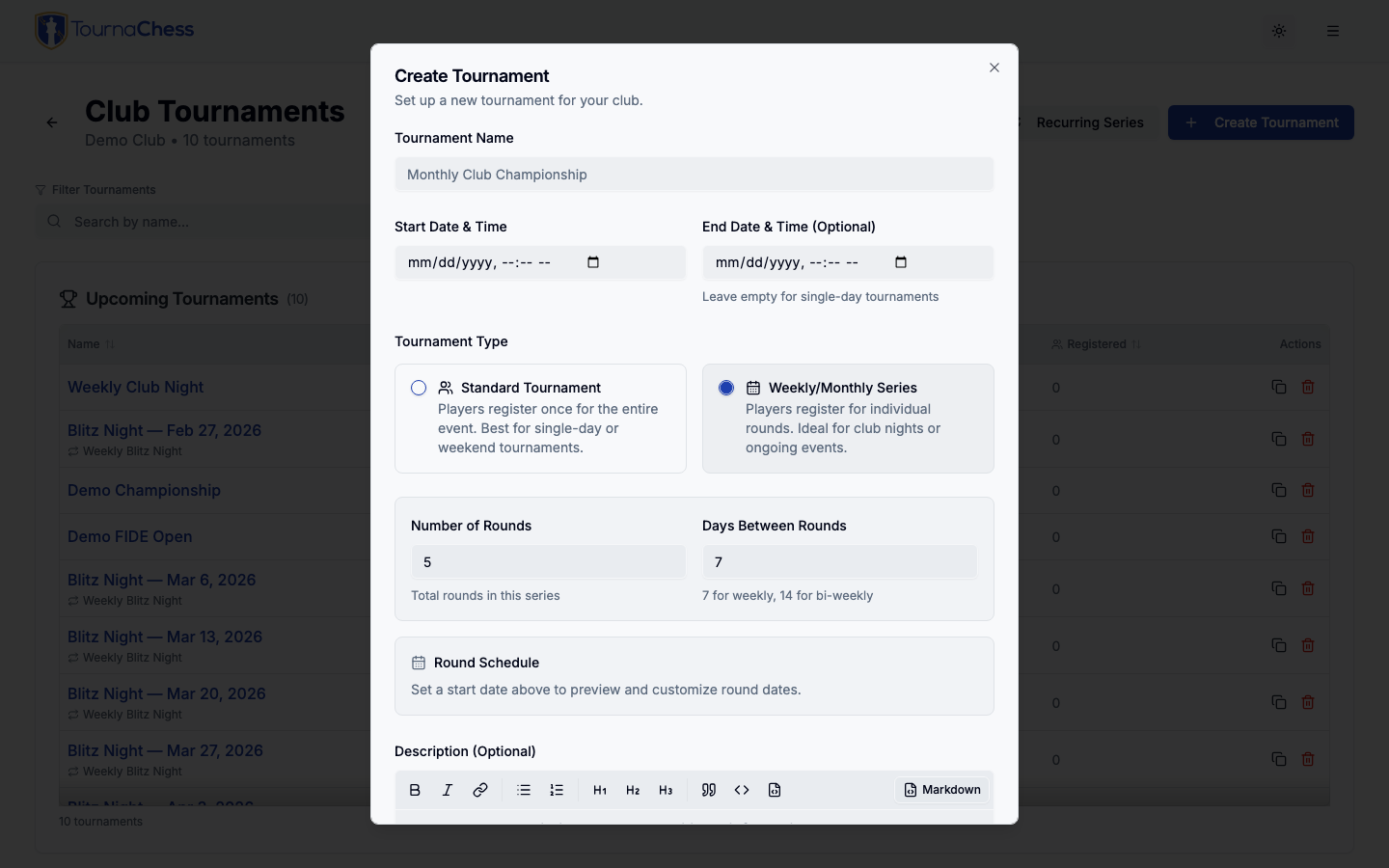
Per Round Mode (Weekly/Monthly)
This mode allows players to register for individual rounds, perfect for ongoing club events where attendance varies week to week.
How It Works
- Tournament is created with multiple rounds, each with an optional scheduled date
- Players register for specific rounds they want to play
- Registration remains open throughout the tournament (until the final round is paired)
- Players can return and register for additional rounds at any time
- Players select one or more rounds per registration
Note: Points 3 and 4 assume Who Can Register is set to Anyone or Club members only. Setting it to TD managed stops players adding rounds for themselves as well as stopping new sign-ups — directors add each player to each round instead. See Who Can Register.
Use Cases
- Weekly Club Events: Thursday night classical
- Monthly Series: 4-week events with one round per week
- Drop-In Events: Any format where players can join mid-series
Player Experience
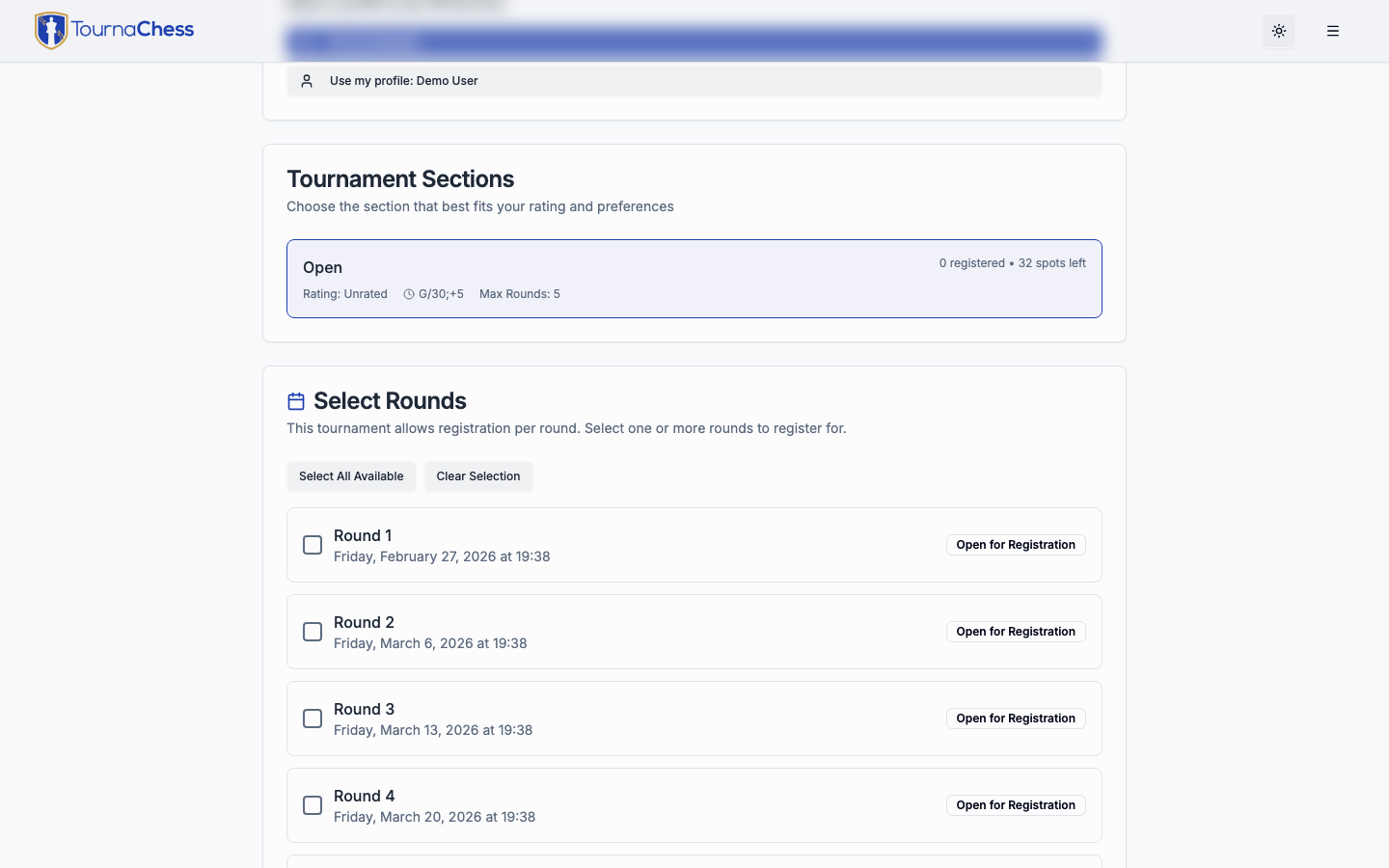
- First-Time Registration
- Select which rounds to play
- Rounds already paired are unavailable
- Complete registration and payment for the selected rounds
-
Returning for Another Round
- System recognizes you (by USCF ID, FIDE ID, full 8-character NWSRS ID, or name)
- Shows which rounds you're already registered for
- Select additional round(s) to add
- A round you withdrew from is offered again, so you can sign back up for a week you had dropped (paying again if the round costs money), as long as that round has not been paired yet
-
Round Schedule
- See upcoming round dates on registration page
- Plan which weeks to attend
BYE Requests
If a section accepts BYE requests, you can ask for a BYE on rounds you cannot attend while you register. In Per Round mode the registration form only offers BYEs that make sense for when you are joining -- rounds you cannot validly BYE are shown but not selectable, so you can only ever pick a valid combination. The rules are:
- You cannot BYE a round you are registering to play. The rounds you sign up for are rounds you intend to play, so they cannot also be BYE rounds.
- You cannot BYE a round before a round you have already played. Once a round has been paired, the rounds before it are locked -- a BYE there would retroactively change standings and pairings that already happened.
- Late entrants can still BYE the rounds they missed. If you join after some rounds have already been played and you were not entered in them, you can request a BYE for those missed rounds when you register (subject to the section's BYE policy). This is how a player who joins in week 3 can still record a half-point for weeks 1 and 2. The points appear in the standings immediately and are included when the next round is paired.
- No BYE for the final round once the event is underway. After Round 1 has been paired, the final round is no longer available as a BYE.
- A granted BYE is fixed at registration. A BYE that has already been granted for a round cannot be removed or requested again from the registration form -- contact the tournament director to change an existing BYE. That also means you cannot sign up for -- or pay for -- a round you already hold a BYE for: the BYE stands, so you would be on the roster for a round you sit out. Ask the tournament director to remove the BYE first.
- You can ask for a BYE while adding rounds. Coming back for another round and asking for a BYE on a different round works in one step, on the same form -- the BYE is recorded with the rounds you add, and appears on paid registrations once the payment goes through. Free additions save all selected rounds and BYEs together: if any selection is refused, none of that submission is added, so you can correct it and try again.
- You cannot BYE a round you withdrew from. Sign up for it again if you want to play it; ask the tournament director if you want a half-point BYE for it instead.
- Section limits and restrictions still apply. The section's maximum number of BYE requests, the point value of requested BYEs, and any rounds the organizer has blocked from BYEs all still apply. See Creating Tournaments for how organizers configure these.
Tournament Director Experience
-
Setup
- Create tournament with "Per Round" registration mode
- Set optional dates/times for each round
- Configure payment options as usual
-
Ongoing Management
- Registration stays open throughout, unless you set Who Can Register to TD managed — then players can neither sign up nor add rounds for themselves, and you add each player to each round
- Pair each round when ready (only registered players are paired)
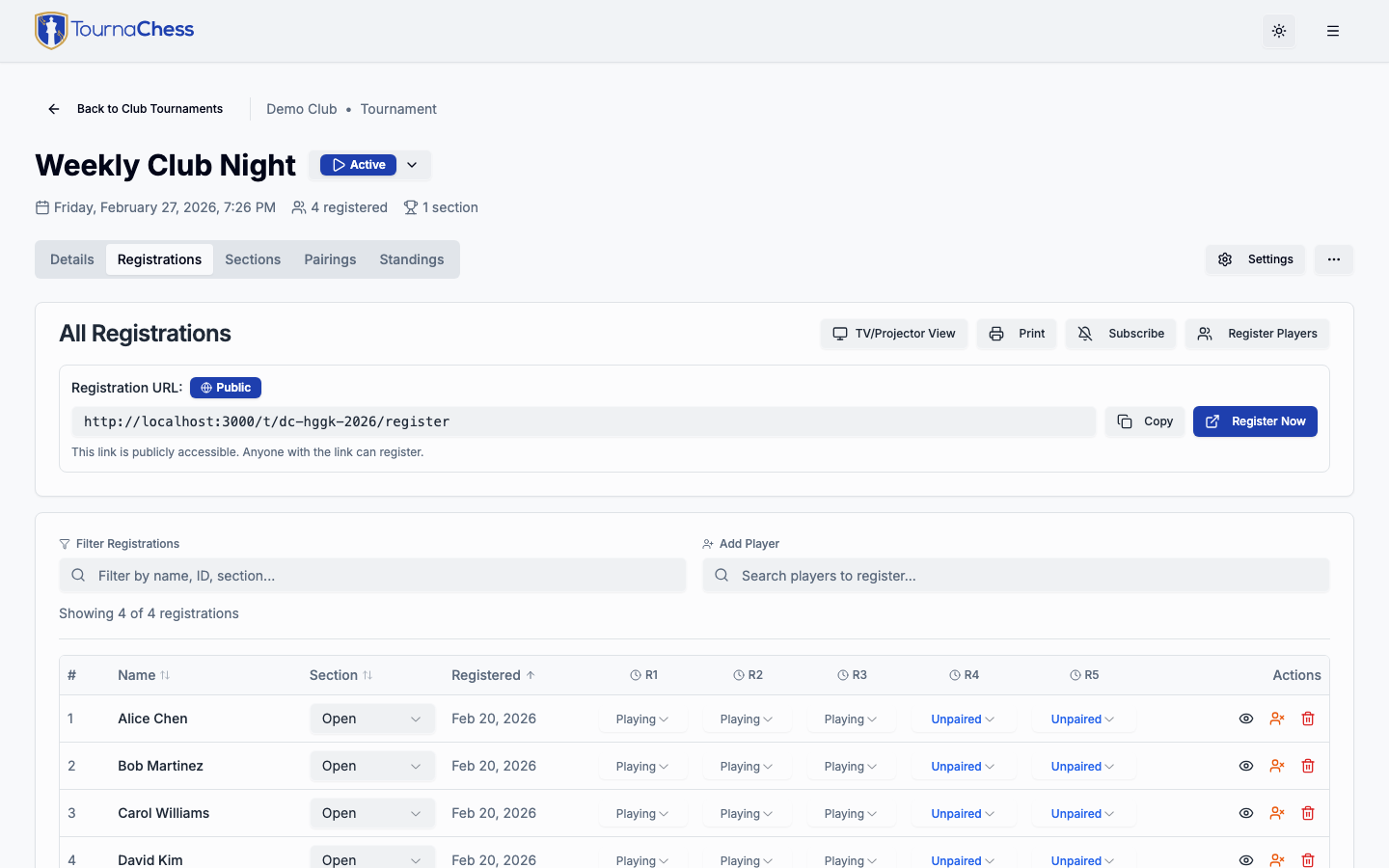
- View which players are registered for each round
- Add or withdraw players from specific rounds
- Put the current round's entry list on a venue screen with the TV/Projector display -- in Per Round mode it shows only the players the next pairing will include (signed up for that round, BYEs excluded), so you can check each section's count before pairing
-
Next Round Only (optional)
- Enable the "Next round only" toggle in Registration settings to restrict players to registering for only the next upcoming round
- Future rounds are visible on the registration page but disabled, with a message like "Opens after Round 2 completes"
- As soon as a round is paired, the next round automatically becomes available for registration -- it does not wait for the round's games to finish
- This prevents players from signing up too far in advance and reduces no-shows
- Can be toggled on or off at any time, even after the tournament is active
- With Recurring Series
- Build the template as a Per Round tournament with the rounds and round dates you want -- four rounds a week apart, say
- Each generated tournament copies the template's rounds and shifts every round date by the same amount as the tournament date, so the weekly schedule repeats without being re-entered
- See Recurring Series for the scheduling options
Round Scheduling
Both tournament modes support optional round scheduling, but it's especially useful for Per Round tournaments.
Setting Round Dates
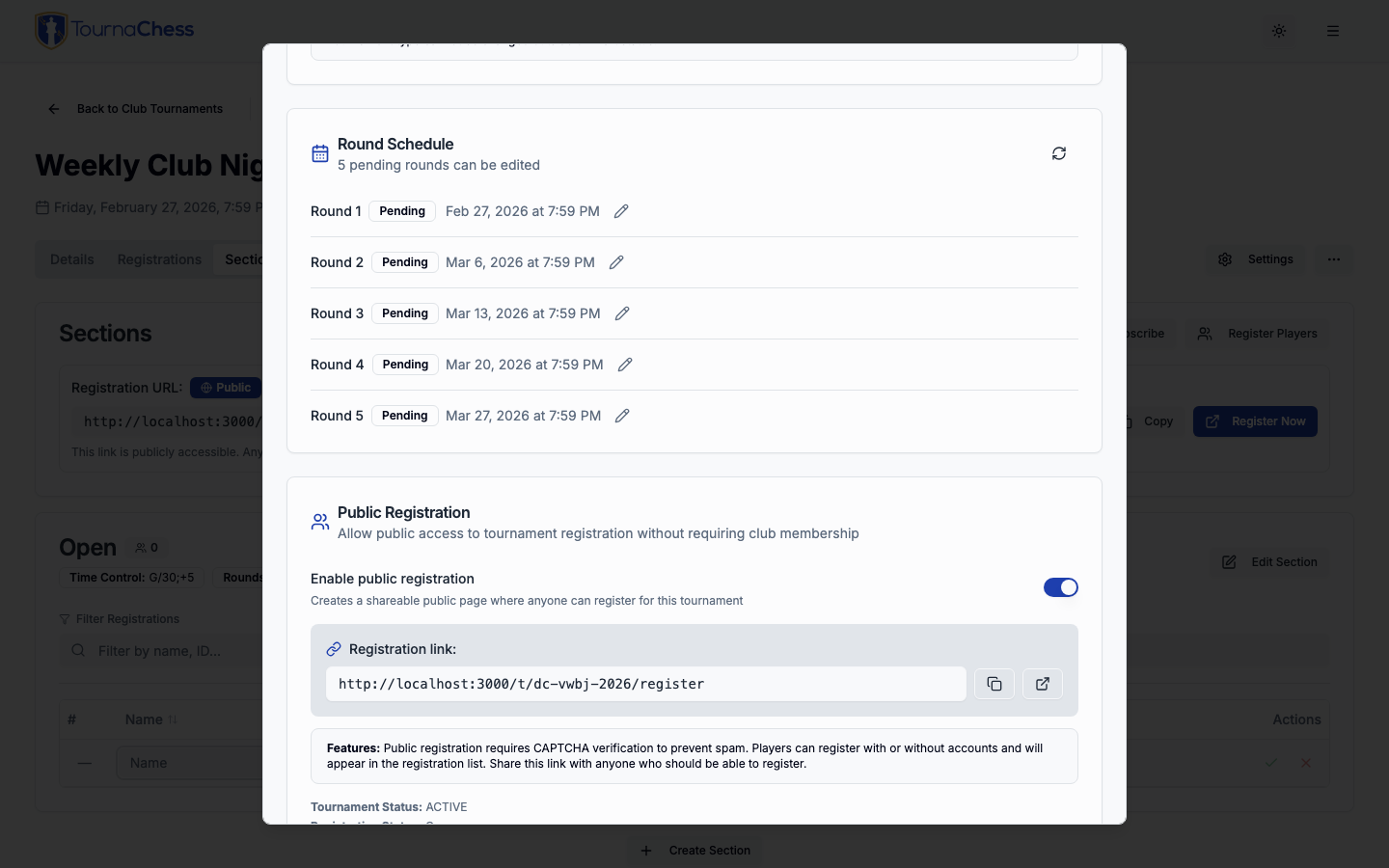
- Each round can have an optional date and time
- Displayed on registration page and tournament details
- Helps players know when to show up
Example Schedule
- Round 1: Thursday, January 9, 2025 at 7:00 PM
- Round 2: Thursday, January 16, 2025 at 7:00 PM
- Round 3: Thursday, January 23, 2025 at 7:00 PM
- Round 4: Thursday, January 30, 2025 at 7:00 PM
Notes on Scheduling
- Dates are primarily informational -- the system does not auto-pair when a date arrives
- Tournament directors retain full control over when to pair each round
- When rounds are added (by increasing the round count), new rounds are seeded with dates based on the existing round interval
Choosing the Right Mode
Choose Full Tournament When:
- Players commit to the entire event upfront
- The event runs over consecutive days
- You want simpler registration management
- All players pay the same fee for the whole event
Choose Per Round When:
- Attendance varies from week to week
- Players may join after the first round
- The event spans multiple weeks with breaks between rounds
- You want per-session payment flexibility
Comparison Table
| Feature | Full Tournament | Per Round |
|---|---|---|
| Registration timing | Once, before tournament | Per round, ongoing |
| Payment | One payment for event | Payment per round |
| Joining mid-tournament | Not allowed | Allowed |
| Player commitment | Full event (minus BYE requests) | Individual rounds |
| Pairing includes | All registered players | Only players registered for that round |
| Best for | Events over consecutive days | Weekly/monthly club events |
Frequently Asked Questions
Can a player register for multiple rounds at once in Per Round mode?
Yes, unless "Next round only" is enabled. With the default setting, players can select multiple rounds at once using the round selection checkboxes. With "Next round only" enabled, only the next upcoming round is available for registration.
Can a player who joins late request byes for rounds that already happened?
Yes. A player who registers after some rounds have already been played -- and who was not entered in those rounds -- can request a BYE for the missed rounds during registration, subject to the section's BYE policy and limits. The BYE points are applied to the standings immediately and used for subsequent pairings. They cannot add a BYE for a round earlier than one they have already played, since that would retroactively change results that already stand.
What happens if a player doesn't show up for a round they registered for?
The tournament director can mark them as withdrawn for that round or handle it as a forfeit, depending on club policy.
Can I switch a tournament from Full Tournament to Per Round mode?
Switching registration mode is only allowed while the tournament is in DRAFT status and has zero registrations. Once players have registered, the mode is locked.
How are standings calculated in Per Round tournaments?
Standings work the same as Full Tournament mode. Players accumulate points for rounds they play. Rounds they weren't registered for are treated as "Unpaired" (similar to a zero-point bye).
Can I use Per Round mode with USCF-rated events?
Yes. The registration mode only affects how players sign up. Rating submission and all other tournament operations work the same way.