

School & Scholastic Chess Clubs
TournaChess started in a school chess club, and scholastic events are still much of what runs on it. This guide is for a teacher, coach, or parent volunteer deciding whether it fits their club: whether an event can be run inside a single meeting, how one can span several meetings, how parents register, and how teams, grades, and trophies are handled. It also lists what TournaChess does not do, so nothing surprises you on tournament day.
The short version
- One meeting or many. A four-round event at five minutes per player fits in an hour-long meeting. A term-long Swiss runs one round per week: as a Per Round tournament players sign up for week by week, or as a Full Tournament where the director marks a missed round as a bye.
- Parents register from a phone. Open events let parents sign up without an account unless the director requires sign-in for the entry option they choose. A parent with an account can manage every child from one family account.
- Grades and schools are built in. Each section can ask for a grade and a team or school, and TournaChess scores teams across sections and avoids pairing teammates against each other.
- Unrated is fine. A section can be unrated, USCF rated, NWSRS rated, or both, so a beginners' section needs no IDs at all.
- Helpers need no accounts. A shared Guest TD login lets parent volunteers enter results from their phones.
Running an event in a single meeting
A school club has perhaps sixty minutes. Here is how a four-round event at game in five minutes fits, with time between rounds for results and pairing. A longer meeting can afford a slower control.
Set up beforehand. Create the tournament with the sections you want, usually one per grade band: "K-2", "3-5", "6-8". Each section has its own number of rounds, time control, and rating type, so the K-2 section can be unrated while the 6-8 section is USCF rated. Set Who Can Register to TD managed if you keep the roster yourself, and import it from a spreadsheet -- a sign-up sheet or a Google Form export works. Or leave registration open and let parents sign up from a link.
At the start of the meeting. Add anyone who turned up unexpectedly with TD Quick-Add: a name is enough, and a USCF ID pulls in the rating. Then choose Pair All from the Actions menu to pair every section at once, review the pairings, and confirm the round. Put the pairings on the classroom projector using the display view; the kids find their board and opponent there.
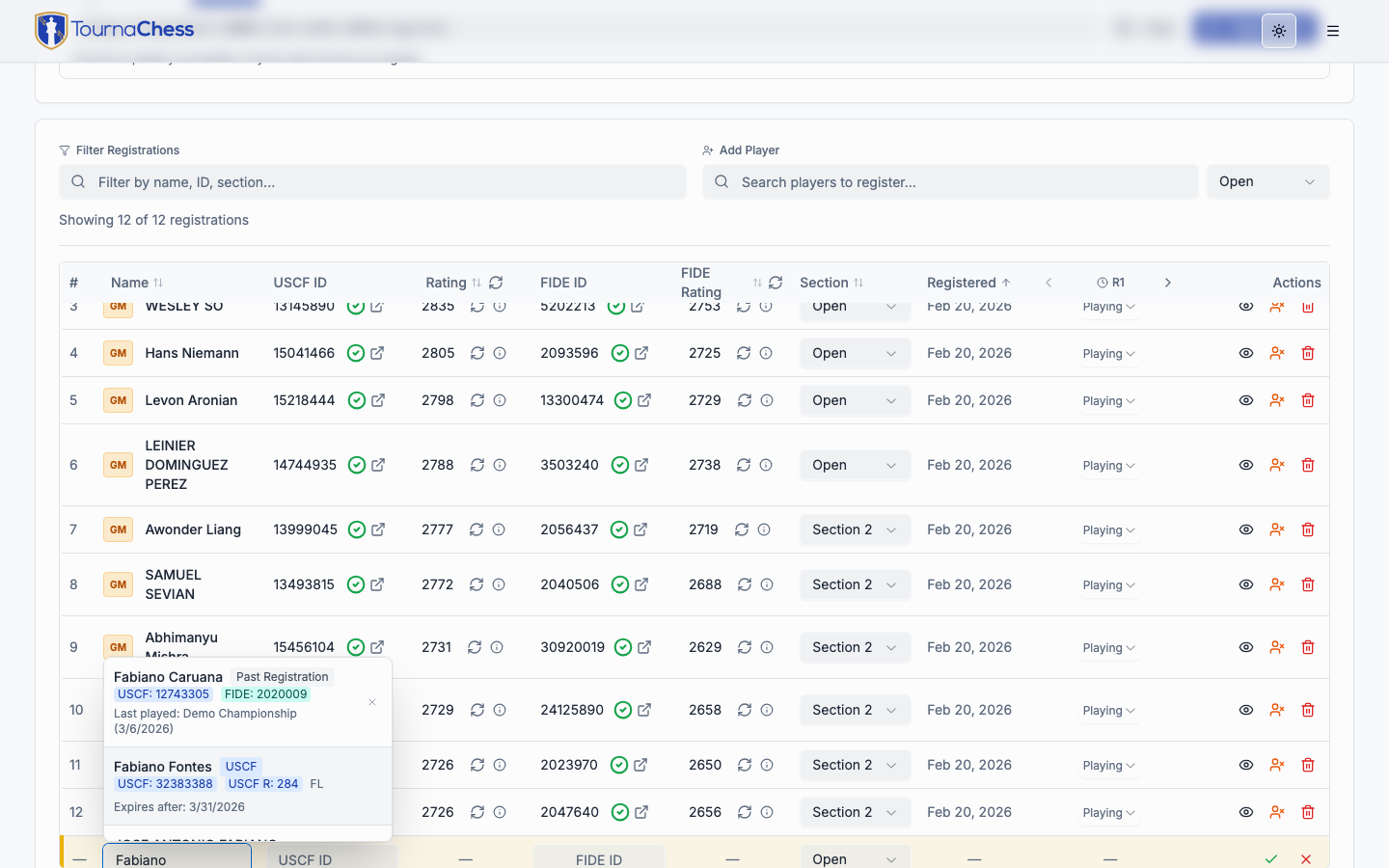
During play. Record results as games finish with 1-click entry from a laptop or a phone. A parent helper signed in through the Guest TD login can enter results too, including directly on the projector display. When a section is done, Pair All again. Standings update on the projector as results go in.
Wrapping up. When the last result goes in, TournaChess asks whether to mark the tournament complete; accept, and the standings and any prizes switch from projected to final. Print standings and team standings for the awards table, and if any section was rated, export it for submission afterwards.
A few details make this work in a short meeting: pairings for every section come from one action, result entry is one click per game, and parents can register without logging in when the chosen entry option allows guests.
Spanning several meetings
A club that plays one round a week has two options.
- A Full Tournament with one round per meeting. Give each round a scheduled date. Rounds are paired when you choose, not on a timer, so a snow day just shifts the schedule. For a child who misses a week, the director sets that round to a BYE from the registrations table, worth zero points or half a point as your policy dictates. A child who joins in week three is added with Quick-Add and paired from then on.
- A Per Round tournament. Players (or parents) sign up week by week. This suits an after-school club where attendance varies. The Weekly Club Tournaments guide covers this shape in depth, including how missed weeks and late joiners are handled.
For a whole term or year, a Recurring Series creates each week's event from a template, and a Grand Prix keeps a season-long leaderboard with a participation point for every week played, which younger players find motivating.
How parents register
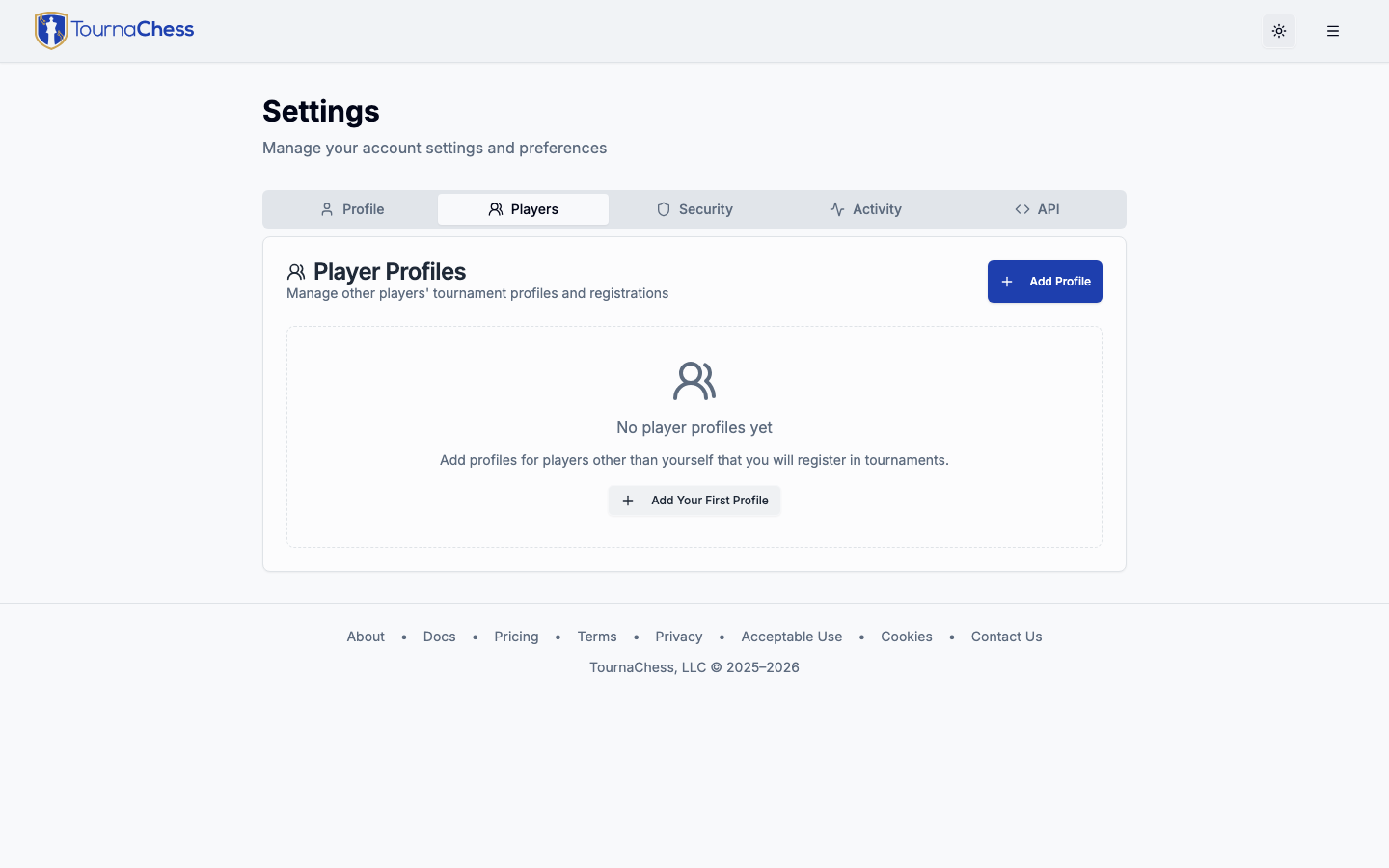
Guest registration when allowed. A tournament that is open to anyone has a public registration page. A parent opens the link, enters the child's name, an email address, and the section, answers any questions you added, pays if there is a fee, and gets a confirmation email with the details. An individual payment option can require a logged-in account even when the event is open; the form offers sign-in and account-creation links for that option. Unless you turn off Allow self-withdrawal for the event, that email also carries a Withdraw button in case plans change.
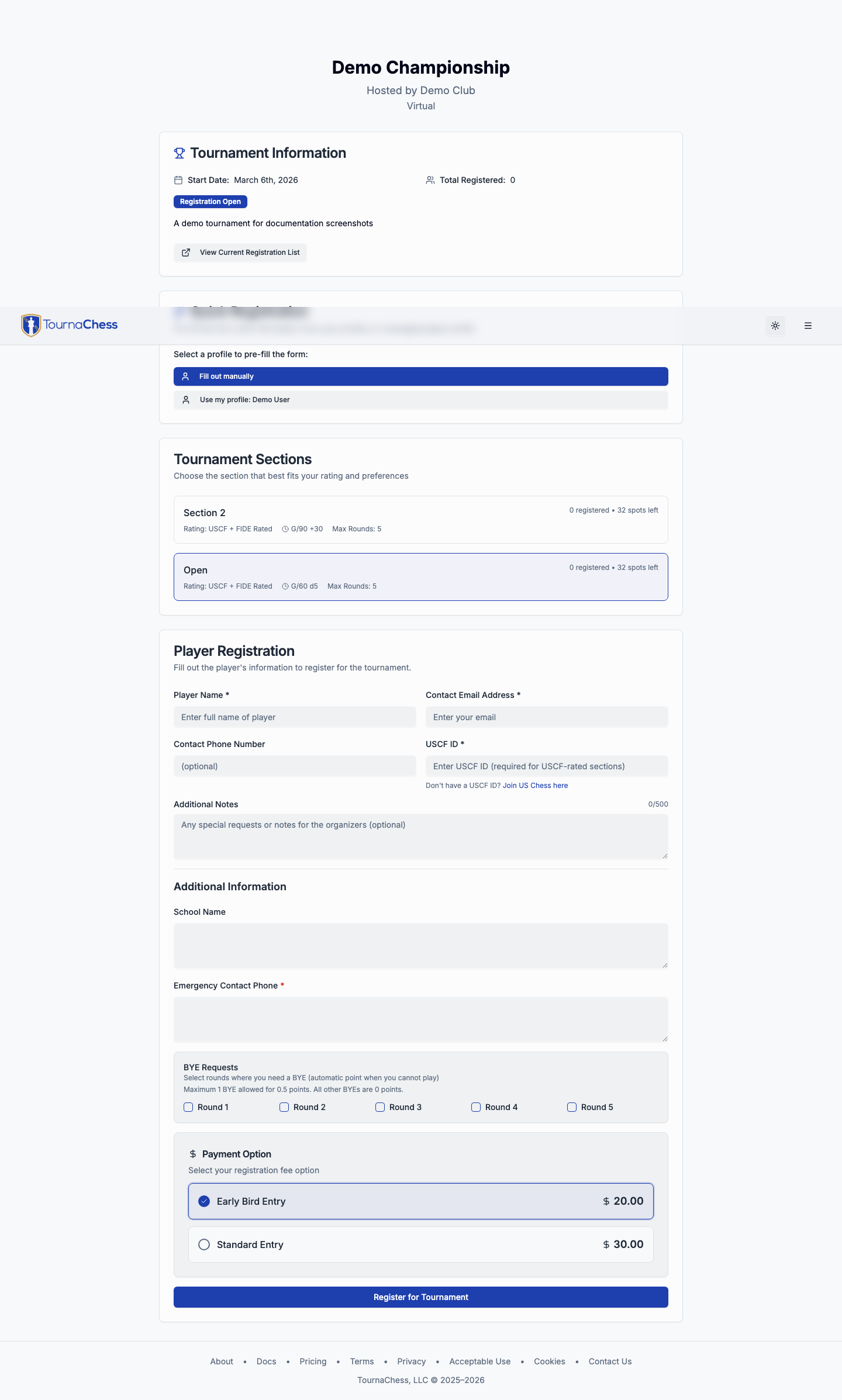
One account for the whole family. A parent who creates a free account can add each child as a managed profile with the child's name and rating IDs. Registering then means picking which child, and each child's tournament history builds up under their own profile.
Following along. The tournament page shows pairings and standings on a phone. The pairings filter matches a name, board number, rating ID, or school, so a coach can pull up every board their school is playing on; the standings filter matches names, ranks, and rating IDs but not schools. Parents who opt in receive each round's pairing by email for free, or by text where the club has SMS credits; one phone can follow several children. A projector at the venue can show a QR code that opens the page.
Privacy for children's events. Registration and public viewing are separate switches. You can keep pairings and results behind a club login while still letting parents register from the link. See Who can register vs. who can watch.
Payments. Entry fees are collected through Stripe Connect, paid straight into the club's own account. Early-bird and late pricing, promo codes for scholarships or siblings, and a record of who paid cash at the door are all supported. Events with no fee have no payment step and no platform fee.
Teams, schools, and grades
Grade is a built-in registration field, from Pre-K through 12 plus Adult. Each section decides whether it is required, optional, or off. The grade appears under the player's name in the registrations list, in the registration emails you receive, in the CSV export and import, and in the club's player records, so you can spot a third-grader who ended up in the middle-school section before pairing.
Team or school is a second built-in field, with a label you choose ("School", "Team", "Club") and help text for parents. When it is in use, three things become available:
- Team pairing avoids pairing teammates against each other, following the USCF Rule 28N variant you choose. It is an avoidance rule, not a guarantee: under the default Plus Two variant the restriction lifts for a player whose wins exceed losses by two, and even Never allows the sole leader to meet a teammate in the last round. This is available on sections that use the USCF Swiss pairing method.
- Team standings rank each school by the sum of its top scorers (you choose how many, four by default). When a school's players are spread across the K-2 and 3-5 sections, the Consolidated view scores the school on its players from every section together, which is how most scholastic team trophies are decided.
- Roster cleanup. Parents type the school name, so "Lincoln Elementary" and "Lincoln Elem" both arrive. The Teams tab flags look-alikes and lets a director rename, merge, or clear a team for every player at once. On a publicly viewable event the registration form also suggests existing names as parents type; on a private one it cannot, so expect more cleanup there.
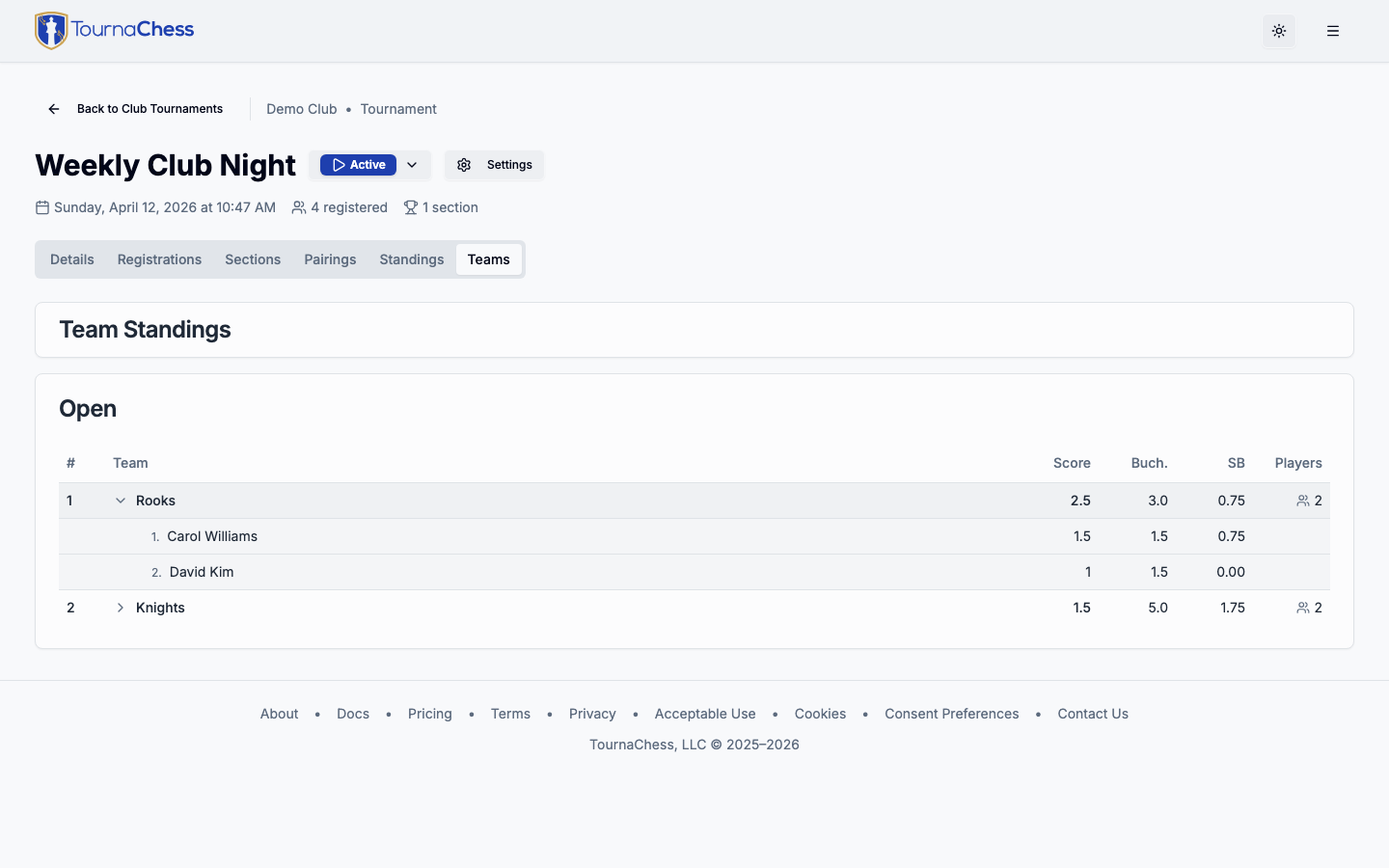
Team standings and the team roster both print, with every member listed and the scoring places marked, so a coach can check the arithmetic at the awards table. The tiebreak columns are hidden by default and print only when you expand them on screen. See Team Standings and Team Roster.
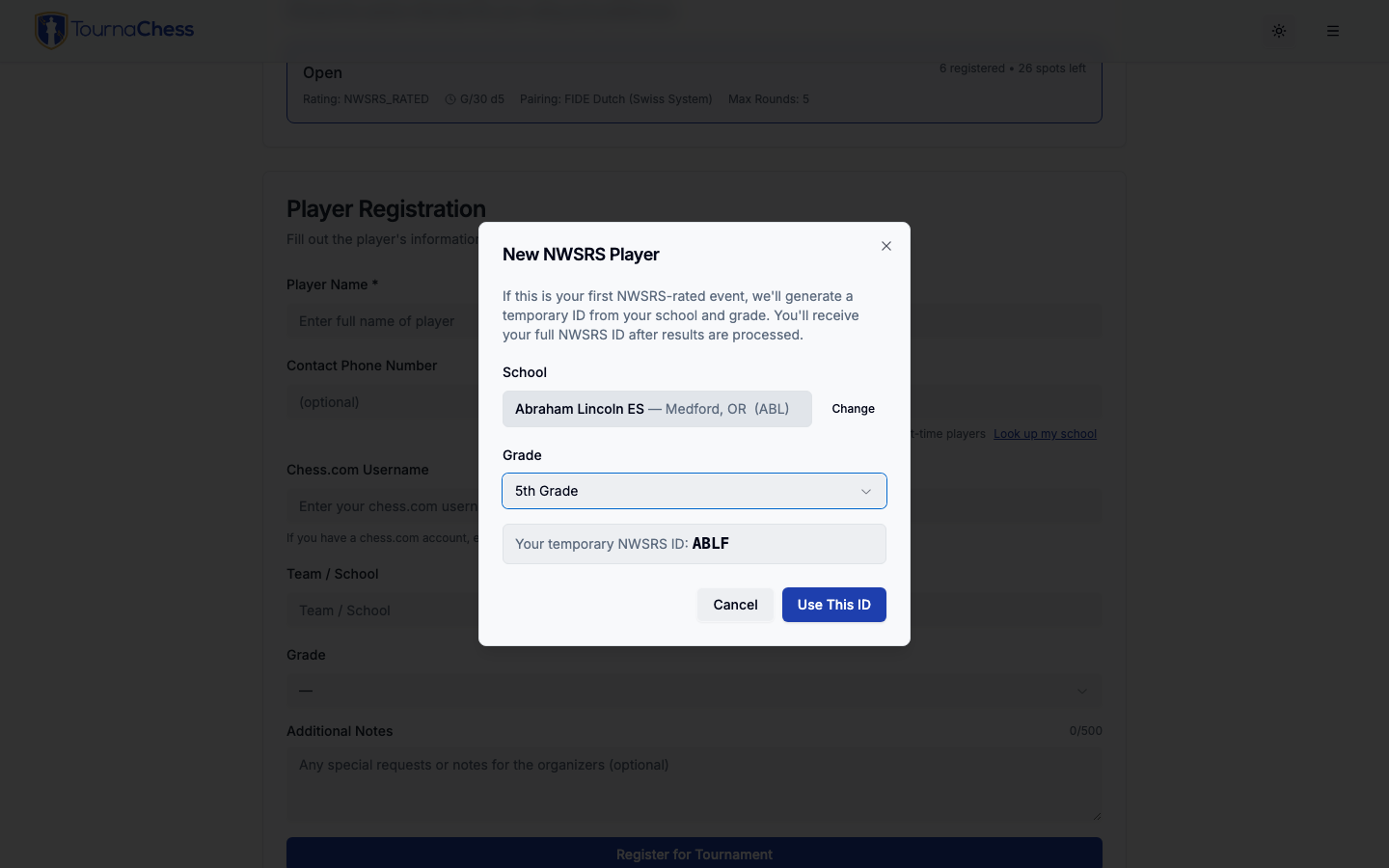
In the Pacific Northwest, sections rated through the Northwest Scholastic Rating System go further: a validated NWSRS ID fills in the player's school and grade automatically, and a first-time player picks their school and grade from a list to get a temporary ID.
Trophies and awards
For USCF-rated sections, the prize calculator works out place winners with USCF tie-splitting rules and can be told a prize is a Trophy rather than cash. It names the winners on the Prizes tab and on a printed sheet for the awards ceremony. Class and under prizes are rating-based, and biggest upset and best female performance prizes are also calculated.
Team trophies are calculated too, and they need no ratings: add a Team Place prize to a section with team standings switched on -- 1st Place Team, 2nd Place Team, and so on -- and the winning schools are named on the Prizes tab and on the same printed sheet as the individual awards, so the whole awards table comes off one printout. Team Place is a trophy by definition and carries no cash. Because it needs no ratings, it is the one prize type offered on an unrated section as well. A school has to enter at least two players to be in the running -- a single entrant is passed over, and the next school down takes the trophy.
Under prizes can also be configured in Online-, FIDE-, and NWSRS-only sections, using that section’s rating and the threshold you choose. Class, place, biggest upset, and best female performance prizes remain USCF-only; best debut also works on a FIDE- or NWSRS-rated section. For an unrated or NWSRS-only section, read the place winners off the printed standings, which carry the same tiebreaks.
What the calculator does not do: prizes restricted by grade or age ("Top 4th grader", "Best under 10") are not automated. Most scholastic organizers get the same result another way -- put each grade band in its own section, so the top places in each section are the grade awards.
Ratings and reporting
Each section chooses its own rating type, so one event can hold an unrated beginners' section, a USCF-rated section, and an NWSRS-rated section. Rated sections look up ratings automatically when a parent enters the ID, validate USCF memberships, and export in the format the rating body expects: DBF files for US Chess, SJSON for NWSRS. A section's USCF scholastic settings are carried in the export. See Ratings Overview.
Volunteers and helpers
- Tournament Directors are club members you promote. Every director in the club can manage every club tournament, and there is no per-user charge.
- Guest TD is a shared, password-protected login for tournament-day helpers, so a parent at the results table can sign in on a phone or the projector device and enter results without creating an account. It grants broad, club-wide access to existing tournaments, subject to the shared-account restrictions in Guest TD Accounts: it cannot use normal tournament creation or duplication, create recurring or Grand Prix series, or email players on any plan, but it can add tournaments through imports. Every helper sharing the password can view sensitive participant data across the club -- contact details, gender where available, payment metadata (not card numbers or security codes), and administrative notes -- and download player records and registration exports, including collected custom-field answers in registration exports. Use a personal club account for Grand Prix bonus-point management; disabling Guest TD deletes any manual bonus-point awards made by the shared account and can change standings. Share the password only with people you would trust at the director's table, and turn Guest TD access off in club settings after the event. When access is disabled, past Recent Activity entries lose the Guest TD actor label; the shared login never identifies individual helpers. Changing the password stops new sign-ins but does not sign out a helper who is still logged in.
Limitations to know before you start
- Sections are restricted by rating only. A "K-2" section is a name; TournaChess does not stop a fifth-grader from registering for it. The grade field lets you catch mistakes, and directors can move players between sections from the Actions menu.
- No school directory. Outside NWSRS, the school field is free text that parents type, cleaned up with the roster tools. There is no list of schools to pick from.
- Grade and school are per event. They are asked on each registration rather than stored on a family's managed profile, so a parent enters them each time.
- No age or date-of-birth field. Add a custom registration field if you need one; it is collected but does not drive anything.
- No team-versus-team matches. TournaChess runs individual Swiss events with team scoring on top, not team Swiss or match play, and there is no team entry fee or team registration as a unit.
- Team pairing only on USCF Swiss sections. FIDE Dutch and manually paired sections do not offer it.
- Players do not check themselves in or enter their own results. Check-in is a director's indicator and does not affect pairing.
- An internet connection is required at the venue. See Any Device, Nothing to Install.
Related guides
- Registration & Payments -- Registration modes, built-in and custom fields, roster import, and Stripe.
- Running Tournaments -- Pairing, results, walk-ins, team standings, and printing.
- Prize Calculation -- Prize types, trophies, and what is not automated.
- NWSRS Integration -- For clubs in the Pacific Northwest.
- Weekly Club Tournaments -- Per Round events for clubs that meet every week.
Still have questions? Visit our Contact page to get in touch with TournaChess support.